








Who knew IVR systems that once told you to "press 1 to select option A and press 2 to select option B" would witness such a grand leap? A former staple in customer service, IVR automation failed to detect customer concerns due to its rigidity. Not to mention the maze of endless options that callers were expected to navigate, only to meet a dead end. In contrast, AI agents actually listen. Customers lead conversations while the AI agent collects insights and executes actions across multiple channels.
What is Contact Center Automation?
Contact center automation uses AI and software to handle customer support more efficiently. It takes routine queries off your human agents' plates. The repetitive tickets, the basic FAQs, the order updates are all handled by AI while your team focuses on the work that actually needs a human. The result is faster resolutions, lower costs, and a support operation that can scale without hiring proportionally.
A modern AI agent handles:
- Intelligent call routing
- Speech recognition and Natural Language Processing
- Omnichannel support across email, chat, voice, and social
- Real-time assistance for human agents mid-conversation
- Customer service chatbots for handling front-line queries across web, app, and messaging platforms.
According to a report by Gartner, 70% of customers are estimated to begin their customer journeys through one or another form of conversational AI by 2028. In this changing techscape, businesses will grow to deliver personalized solutions more efficiently with the least amount of human involvement. A McKinsey report notes that agentic AI in contact centers is already driving significant cost reductions for businesses that have deployed it. The companies acting on this now are the ones setting the bar their competitors will have to clear.
Why Contact Center Automation Matters in 2026
For most businesses, poor contact center performance is where customer relationships break down. Ineffective resolutions, operational inefficiencies, and mismanagement during peak demand periods can quickly cause CSAT to plummet and costs to spike.
The Cost of Manual Operations
Human teams spend a significant proportion of their time tackling routine queries and FAQs. Your labor costs soar while overall efficiency continues to suffer. When an AI agent handles repetitive work, human agents are able to shift their focus to complex issues that require empathy, creative thinking, and critical analysis.
This reflects in costs, as demonstrated in a survey by Accenture. The study reveals how AI agents reduced manual operational costs for businesses by 30 percent while lifting productivity. Fewer errors, less monotony, and agents who are actually engaged in meaningful work.
CSAT Penalties
A study by Shep Hyken states how 82% of clients expect minimal hold times and would switch companies over slow responses. For large companies with high-volume contact centers, this becomes a pressing concern.
40% of customers move to a competitor when their issue isn't resolved on the first interaction. Agentic AI addresses this directly. Response speeds run 63% faster than human teams, resolution rates follow, and customer loyalty reflects it.
Resolution for Scalability
Legacy Rule-based automation and IVR systems were never built for volume spikes. Manual contact centers require proportional hiring to grow, which narrows margins and creates bottlenecks every peak season.
Contact center automation enables integration of cloud computing and workforce management to handle spikes and dips in customer inquiries. Omnichannel capabilities of these systems are equipped to manage seasonal fluctuations swiftly without compromising on service quality. With agentic AI, your business is able to maintain seamless customer journeys and scale despite seasonal surges.
How Contact Center Automation Works
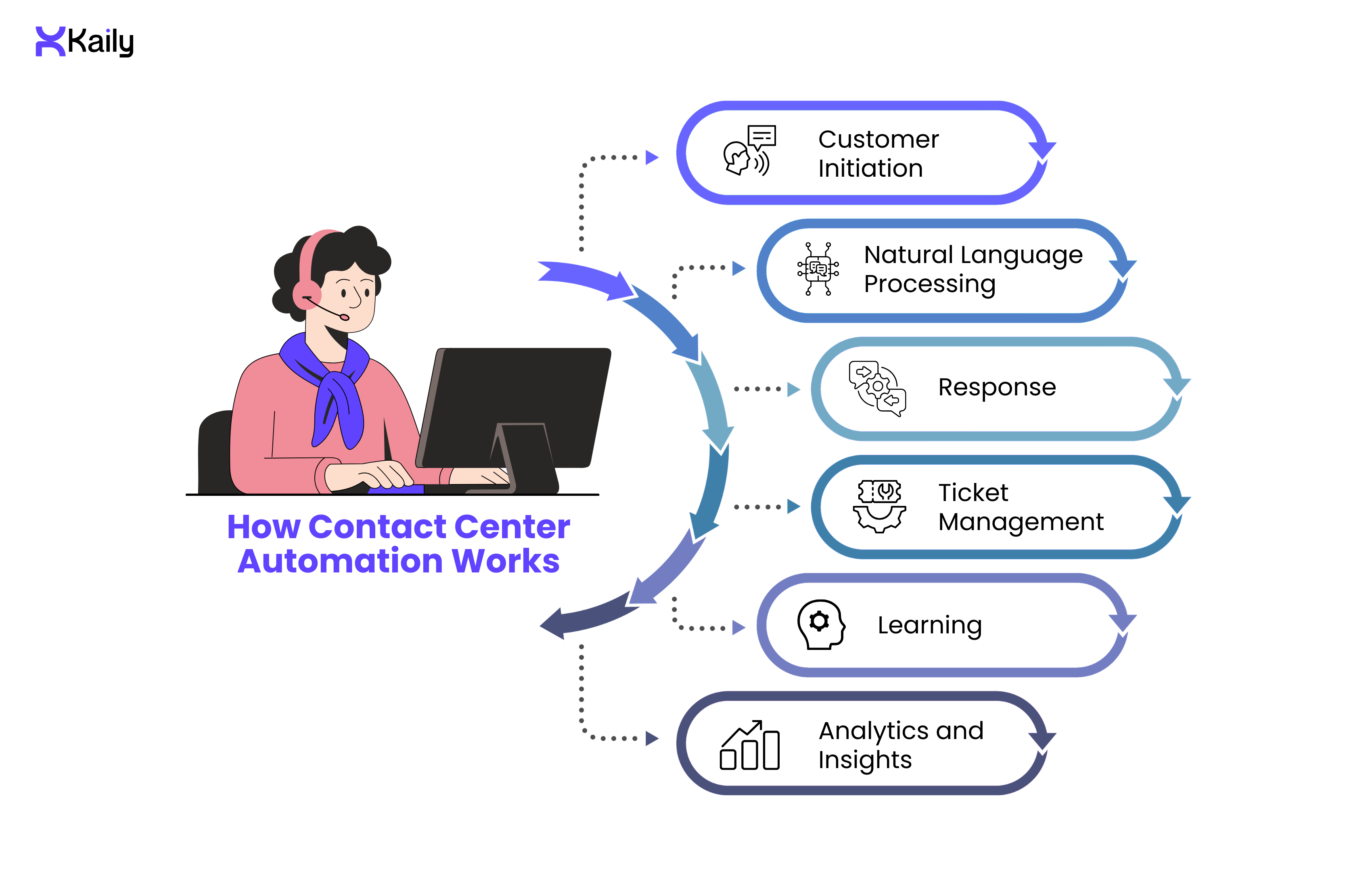
1. Customer Initiation
When a customer places a request with the customer-facing AI agent/virtual assistant or customer service chatbot, the automation system recognizes the customer using speech recognition. The system identifies the channel, whether social media, email, voice, or chat, and pulls conversational or buying history so the customer never has to repeat themselves.
2. Natural Language Processing
NLP decodes what the customer actually means, not just what they literally said. It reads context, tone, and sentiment to determine the right path forward.
For example, if the customer says, “No updates have been shared about shipping for my order, I’m disappointed”, the NLP system decodes the sentiment (frustration, resignation) and determines the best outcome-based route. If the frustration level crosses a threshold, the system routes the conversation to a human agent who can step in and resolve it with the right tone.
3. Response
The automation system by itself is capable of deciding whether to resolve the query automatically or route it to a human agent.
If the customer in our example needs information or solutions beyond the AI agent's limit, it recognizes that and smoothly transfers the case over to a live agent. The conversational history, context of the query, along with additional relevant data, are also transferred so the customer does not have to repeat anything.
4. Ticket Management
Each time a customer reaches out, the system pulls their data from the CRM and creates or updates a ticket automatically. It tags and prioritises the ticket based on the nature of the request, then tracks it through every stage of resolution. Nothing gets lost, nothing needs manual logging. Your team has a complete record of every interaction, organised and accessible without any extra effort on their part.
5. Learning
The more interactions the system handles, the sharper it gets. NLP and machine learning models improve through repeated exposure, which means resolution quality goes up over time without manual retraining.
6. Analytics and Insights
Every interaction generates data. The system tracks CSAT, resolution time, escalation rates, and channel performance so your team can see exactly where the experience is strong and where it needs work.
Key Features To Look For
A contact center automation tool is only as good as what it can actually do. Here are the features that separate capable AI chatbot platforms from basic ones:
1. Multilingual AI Agents
A good AI agent doesn't need a separate script for every language or market. It understands intent dynamically, which means the same agent that handles English queries can switch to Spanish, Arabic, or Mandarin without retraining. The best platforms support over 100 languages and run 24/7, which matters if your customer base spans time zones.
2. Omnichannel Routing
Customers don't stay on one channel. They start on chat, follow up on email, and call when they're frustrated. Omnichannel routing connects all of those touchpoints and routes each request to the right agent based on context and urgency, not rigid rules. Getting this right depends on how well your automation tool handles chatbot integration across your existing stack.
3. Robotic Process Automation
RPA or Robotic Process Automation, handles the backend work that doesn't involve the customer directly. Order updates, system entries, data retrieval, follow-up communications. When combined with AI agents, RPA extends what automation can handle end-to-end, which means fewer tasks fall back to your human team.
4. Workflow Builders
Every business has support processes that don't fit a generic template. Workflow builders let you configure routes, triggers, and escalation logic without writing code. You decide when the AI handles it, when it escalates, and what information gets passed along. The best tools make this straightforward enough that your operations team can manage it without a developer.
5. Access to Knowledge Bases
When a customer asks something specific, the AI needs to find the right answer fast. Knowledge base integration pulls from your existing documentation, policy documents, and product information in real time. It doesn't just pull the closest match. It reads the context of the question and finds the answer that actually fits.
Where Contact Center Automation Makes the Most Difference

Contact center automation is no longer a nice-to-have in most industries. Businesses are using it for chat automation and seamless agent handoff, voice-to-text transcription to review conversation quality, agent script adherence monitoring, real-time sentiment analysis, automated follow-ups after resolution, and proactive outreach before a customer even raises a complaint. Here is where it is making a measurable difference.
Insurance
Customer onboarding and service delivery have been streamlined through insurance chatbots and broader call center automation in the insurance sector.
Studies by the Boston Consulting Group record how insurance firms that have empowered support teams through automation improved productivity by 30%.
- 24/7 support for claims processing and status updates
- Automated renewals, maturity updates, and policy reminders
- Reduced dependence on human agents for routine servicing
- Consistent, accurate responses on policy information
- Instant verification and document collection during onboarding
- Automated follow-ups on pending claims to reduce drop-offs
- Fraud alert notifications and escalation to human agents when anomalies are detected
E-commerce
71% of retail enterprises today deploy agentic AI in business tasks. The volume of order queries, return requests, and shipping updates makes e-commerce one of the highest-ROI use cases for automation. Zendesk's 2025 Trends Report found an 87% reduction in resolution time and 92% CSAT growth among beauty and wellness businesses that deployed AI for customer care.
Amazon runs some of the most sophisticated contact center automation in e-commerce. Their AI agents handle millions of tasks daily without human involvement. Contact center automation handles order tracking, returns, refunds, and proactive shipping delay notifications. The system routes complex complaints to the right team with full order history attached. The result is a support operation that scales across peak seasons like Prime Day and festive sales without proportional headcount increases.
For any e-commerce business, the use cases follow the same pattern:
- Instant responses to order status and shipping queries
- Automated return and refund processing
- Proactive delay notifications before the customer contacts support
- Cart abandonment and post-purchase follow-up automation
- Agents freed up for high-value or complex interactions
- Voice and chat support across every channel the customer uses
Banking Organizations
Singapore's financial sector has achieved 98% AI integration in customer-facing operations. For banks and financial institutions, accuracy, security and compliance matter as much as speed. Banking use cases are usually deeper and complex compared to most industries because banking customers interact with their bank at high frequency across multiple touchpoints including app, website, phone, and branch, and often during high-stakes moments like loan applications, fraud disputes, and investment decisions.
- Instant responses to balance, transaction, and account queries
- Automated password resets and OTP authentication
- 24/7 multilingual support for loan, insurance, and retirement queries
- Fraud detection alerts and immediate routing to specialist agents
- Automated KYC document collection and verification during onboarding
- Credit card dispute initiation and status tracking without agent involvement
- Loan eligibility checks and pre-qualification through conversational AI
- Proactive notifications for unusual account activity, payment due dates, and overdraft warnings
- Automated responses to regulatory and compliance queries
- Cross-sell and upsell prompts based on customer transaction history and product usage.
Healthcare & Hospitality
Both industries run on scheduling, bookings, and time-sensitive information. Automation reduces the administrative load so healthcare professionals can focus on patient care and hospitality teams can focus on the guest experience. Healthcare providers have reported 66% faster query resolution and significantly reduced patient dissatisfaction after deploying conversational AI with full interaction history.
Healthcare:
- Automated appointment scheduling, reminders, and rescheduling
- Prescription refill requests and medication query handling
- Insurance eligibility verification and pre-authorisation support
- Post-discharge follow-up and care instruction delivery
- Symptom triage to route patients to the right care level
- Lab result notifications and follow-up appointment prompts
- Mental health support line automation with sensitive escalation protocols
- Billing queries, insurance claim status, and payment plan information
Hospitality:
- Booking confirmations, modifications, and cancellations without agent involvement
- Real-time information for travellers on check-in, amenities, and local recommendations, including dedicated airline chatbot support for flight updates and booking changes
- Automated refund and compensation handling for delays or cancellations
- Loyalty programme queries and points redemption support
- Proactive pre-arrival communication to reduce front desk load
- Multi-language support for international guests across every channel
Tech and Telecommunications
55% of telecom companies have deployed agentic AI to handle rising customer expectations, according to IBM. High call volumes during outages, launches, and billing cycles make automation essential rather than optional. Telecom is also one of the few industries where customers contact support proactively expecting real-time updates, which makes proactive automation particularly high value.
- Real-time outage and network status updates pushed to affected customers
- Automated billing explanations, plan change notifications, and usage alerts
- Basic troubleshooting walkthroughs for connectivity and device issues
- High traffic management during product launches and promotional periods
- Intelligent ticket routing and escalation for technical faults
- Number porting, SIM activation, and account transfer automation
- Proactive churn detection and retention offers triggered by usage patterns
- Contract renewal reminders and upgrade recommendations based on usage data
How To Choose The Right Contact Center Automation Tool
Most tools have capabilities that are limited to text chats and rule-based responses. Support teams end up struggling to provide seamless customer journeys, especially during peak traffic periods. The right tool handles voice, chat, email, and social, escalates intelligently, and gets measurably better over time. Here is what to ask before committing.
Resolution and Response Quality
- How does the tool measure and improve First Call Resolution?
- What is the average containment rate, meaning how many queries does it resolve without human handoff?
- How does it handle queries it has never seen before?
Integration and Data
- Does it integrate with your CRM, ticketing system, and knowledge bases out of the box?
- Can it pull customer history in real time during a conversation?
- How does it handle data security and compliance requirements in your industry?
Language and Channel Coverage
- How many languages does it support and how does it handle low-resource languages?
- Does it work across voice, chat, email, social, and messaging apps from a single platform?
- Is context preserved when a customer switches channels mid-conversation?
Analytics and Improvement
- What metrics does it track beyond CSAT and resolution time? Can it flag conversations where the AI underperformed for review?
- Does it improve automatically from new interactions or require manual retraining?
Commercial Model
- How is pricing structured, whether per interaction, per seat, or by volume?
- Does the cost per interaction decrease as volume scales?
- What does implementation cost and how long does deployment take?
How Kaily Helps Businesses
- No-code and easy to use
- Let's you build custom AI agents aligned to your brand personality through an agent creation studio
- Executes high-volume customer support tasks to meet the business's growth potential
- Resolves questions swiftly and boosts efficiency in support teams
- Offers video and voice call support for targeted CX management
- Enables smooth exchange between knowledge bases for insightful solutions
- Integrates across tools like CRM and ticket management systems
- Monitors and tracks customer data and conversation history for usable analytics
With Kaily, you get an automation stack that covers all your contact center needs. You don’t need to turn to a second automation tool or deploy additional workarounds. Customers are retained, and your business’s long-term automation strategy remains dependable.
Final Thoughts
Customer expectations have moved faster than most support operations. The businesses closing that gap are the ones treating automation as infrastructure, not an experiment. They are resolving queries faster, scaling without adding headcount, and using every interaction as data to get better at the next one.
If your contact center is still running on rule-based systems or patching together manual processes during peak periods, the cost of that is already showing up in your CSAT scores and your margins.
Businesses that understand this are automatically setting themselves up for success in 2026 through contact center automation tools. Book a demo with Kaily’s team and witness in real time how smart AI agents work in practice.












.png)


