







AI chatbot platforms let you design, deploy and manage chatbots across various channels, including your website, app, WhatsApp and email. Conversational AI platforms use large language models and can connect with CRMs, support tools and enterprise systems to optimise customer support service and related workflows.
As more customers incline towards AI chat agents, businesses are exploring chatbot platforms. This is directly adding to the growth prospects of the AI chatbot market. Research estimates the global chatbot market could grow at a CAGR of 23.3% between 2023 and 2028 to reach USD 15.5 billion by 2028.
What is an AI Chatbot Platform?
AI chatbot platforms can be thought of as a software layer that offers businesses infrastructure and tools to build, deploy and manage chatbots across various channels.
These platforms are built in layers where the channels are on top, then comes the Natural Language Processing/AI layer, followed by logic and integrations, and lastly rounded off by analytics and governance.
While basic chatbot tools can help handle simple scripts, conversational AI platforms add NLP, orchestration, integrations, and analytic capabilities to your business systems.
Chatbot Platform vs Conversational AI Platform vs Best AI Chatbot App
Most businesses go for a full platform when they want to support and optimize many teams, multiple channels, and complex workflows.
Why Businesses Use AI Chatbot Platforms?
Many businesses deploy AI chatbot platforms to offer round-the-clock support to visitors and existing customers.
They also adopt the technological upgrade to capture fresh leads, personalise suggestions, reduce customer response time and boost savings.
As more companies acknowledge these perks, the global GenAI chatbot market is expected to grow from USD 9.90 billion in 2025 to USD 65.94 billion by the end of 2032.
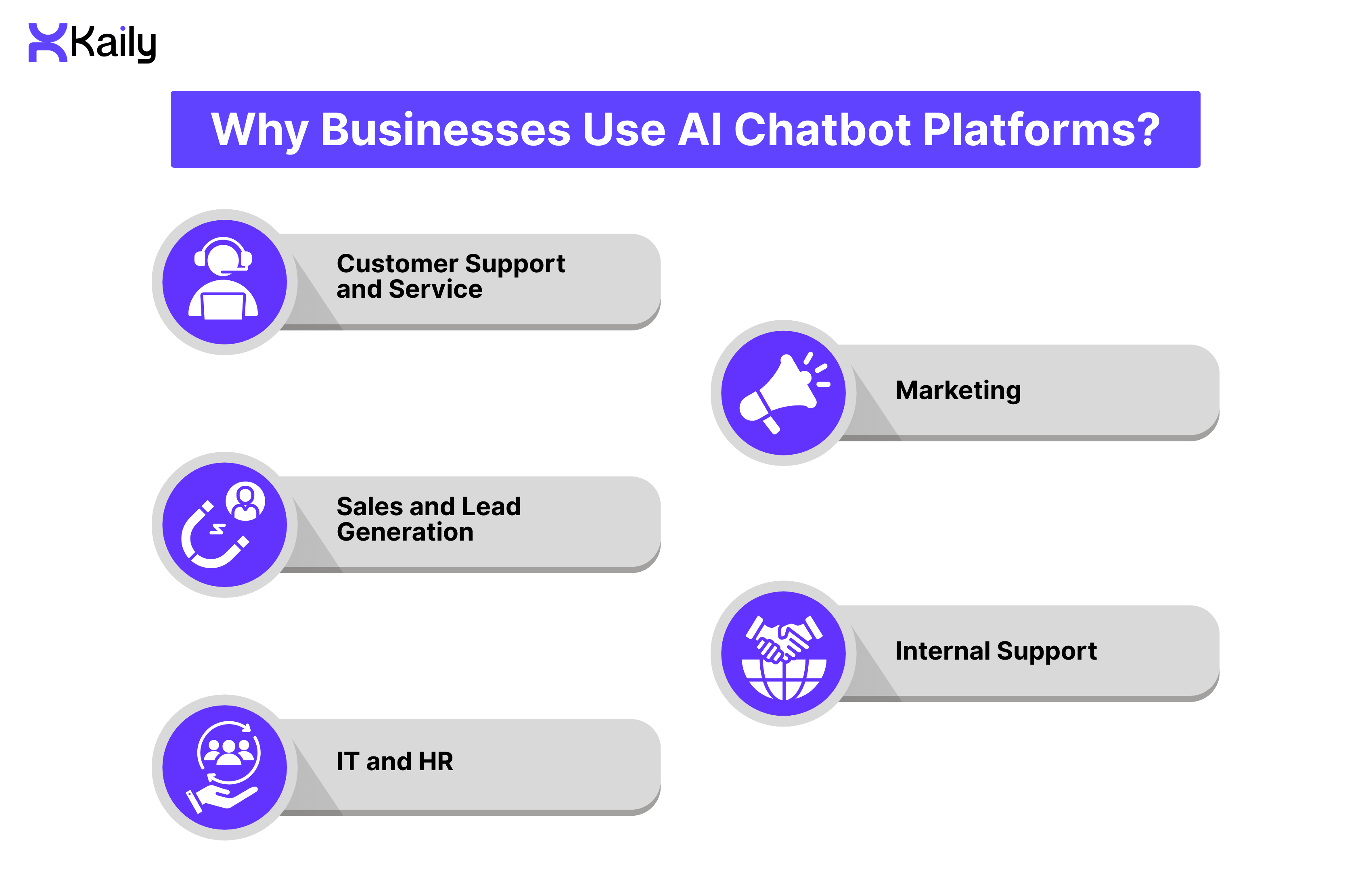
Customer Support and Service
Customer support AI chatbots help customers solve queries, check their order status, track its movement, manage returns, and find answers to common concerns without waiting for a human agent.
Meanwhile, larger enterprises use chatbots to reduce their customer support team’s response time and improve response consistency.
Automated support systems often help businesses lower operating costs and shorten response times because they are built to handle high-volume, repetitive questions.
Advanced chatbots can handle nearly 70% of routine customer inquiries. This helps lower the costs and improve CSAT scores by offering customers clear and instant answers. Industry experts suggest that 68% of users enjoy how quickly chatbots answer their queries.
Typically, when a customer opens a support chat and enters their concern, the AI chatbot agent identifies the question and retrieves an answer from a suitable dataset or source.
Alternatively, the bot triggers a suitable workflow like order lookup or ticket creation. It escalates complex cases to human agents, ensuring quality resolution while freeing the chatbot to handle high-volume queries efficiently.
Marketing, Sales and Lead Generation
Sales chatbots tend to guide users who are actively exploring products or comparing plans. The AI agents collect user contact information, schedule demos and suggest products based on user activity.
In fact, market analyses from Fortune Business Insights note that GenAI improves conversion rates and sales by 30% because of its tailored recommendations.
The chatbots offer suggestions on additional products. When a customer looks up a product or asks a question, the chatbot recognizes the intent and suggests a demo time and collects their name and email address to set up a call.
On the other hand, when a customer abandons a cart, the chatbot sends a reminder and may share an ongoing offer to encourage checkout.
Internal Support, IT and HR
Internal chatbots assist employees with routine tasks and common concerns. Such bots can quickly reset passwords, explain HR policies to new and existing employees, generate IT tickets, simplify the onboarding process and provide instructions for internal workflows.
In fact, industry experts found that nearly 70% of organizations saw significant cost reductions due to automation of HR processes.
Large organizations also reported faster ticket resolution as employees did not have to wait around for longer email threads or support queues to seek basic answers.
Key Features of a Modern AI Chatbot Platform
Modern AI chatbot platforms for enterprises come with multiple features that allow internal teams to design, deploy and manage workflow automation.
No-Code Bot Builder and Flow Designer:
Platforms with visual builders allow teams to create conversations through drag-and-drop blocks. Each block represents prompts, conditions, triggers, API calls, and messages. Thanks to this setup, non-technical teams do not need to write code to design chatbot workflows. Companies can also use this feature to standardise prompts and reuse templates across different departments.
NLP/LLM Engine and Hybrid Logic:
Most AI chatbot platforms can detect user intent for structured queries, extract entities to capture important details, and rely on LLM-based text understanding to ensure natural conversations.
Modern platforms also tap into knowledge bases to deliver users factual answers and refer to rules and workflow logic to trigger predictable actions.
The combined forces allow platforms to deliver more relevant and accurate solutions. Hybrid models are increasingly common in enterprise products. They combine deterministic logic for reliability with LLM flexibility for natural conversations.
Omnichannel Chatbot Support and Integrations:
A Chatbot can reach customers on channels where they are most active, like mobile apps, websites, SMS, email, Messenger and WhatsApp. So, to ensure consistency, most enterprises integrate their chatbot agents with CRM, ERP, ticketing, and payment systems.
It allows teams to ensure data is consistent and up to date across departments, making multichannel messaging a key factor for enterprises to switch to conversational AI chatbots.
Analytics, Training and Optimization:
AI chatbot platforms also offer dashboards where you can track what and how your customers search, what topics they are most interested in, and where conversation typically breaks.
The dashboard includes conversation review tools, feedback loops and clustering to highlight pain points. This insight allows teams to refine prompts and improve the platform’s intent models. And with regular bot training cycles, companies improve their LLM responses, increase efficiency and optimize support for various workflows.
Security and Compliance:
Most modern chatbots support role-based access controls, encryption, data masking, and PII redaction. This makes them suitable for enterprises that require strict data access controls and auditability, helping organizations maintain compliance.
Additionally, they are compliant with GDPR and SOC2 and offer audit logs that note every change. These privacy and governance features are quite crucial for regulated industries.
Types of AI Chatbot Platforms
Rule-Based Chatbot Platforms
They are traditional chatbots that function on predefined decision trees and structured conversational flows. They are adept at answering commonly asked questions, offering support with predictable tasks or guided workflows. Rule-based chatbots are aided by explicit logic, which makes their behavior quite predictable.
These customer support chatbots are cost-effective and require low maintenance, which makes them popular among SMBs and developers. In fact, developers can update or extend their flow with ease.
However, they lack the ability to interpret varied user inputs and struggle to respond to open-ended queries or unexpected phrasings. That's why these traditional systems have limited adaptability and are mostly task-orientated.
LLM-Native and GPT-Powered Platforms
They are built on Large Language Models, which help with natural language understanding and generating responses. These chatbots understand diverse inputs and their underlying intent, then generate responses after retrieving information from relevant knowledge bases. As a result, they offer natural and less rigid responses. Additionally, they can adapt to different user styles and contexts to offer personalized replies.
Due to these capabilities, LLM-powered chatbots that use models like GPT-3.5, GPT-4, or LLaMA are deployed across fields like education, business services, healthcare, and customer support. In fact, when it comes to education or language learning setups, these chatbots can act as personal tutors or practice companions.
Notably, the LLM-based platform’s reliance on knowledge base ingestion often becomes a problem if the source is incomplete or the retrieval process is inefficient. As a result, users may receive inaccurate information or advice. However, blending LLM generation with external sources can help reduce errors and improve the accuracy of responses. Organizations with multiple users and high-volume queries may face higher computational costs for adopting these platforms.
Hybrid Enterprise Chatbot Platforms
These platforms combine multiple technologies and design paradigms to respond to user queries. For instance, they follow structured rules and workflows to complete predictable tasks and rely on classification models to sort queries into categories like feedback, billing, or technical support.
Hybrid platforms also use LLM reasoning and retrieval-augmented generation to answer complex queries. In other words, these systems route straightforward queries to intent-based responses and route complex questions to the LLM and retrieval-augmented generation source.
This hybrid approach can achieve 95% accuracy with low latency, which outperforms pure intent or retrieval-based generation systems. Because of these capabilities, hybrid models are adopted by enterprises that have complex workflows or demand high reliability.
These platforms combine rule-based logic, intent classification and LLM-based generation to balance performance and cost. Enterprises use these conversational AI platforms for the control they offer over logging, compliance checks, integration with ERP and CRM, audit trails, role-based access, and escalation paths to human subject matter experts.
How to Choose the Right AI Chatbot Platform?
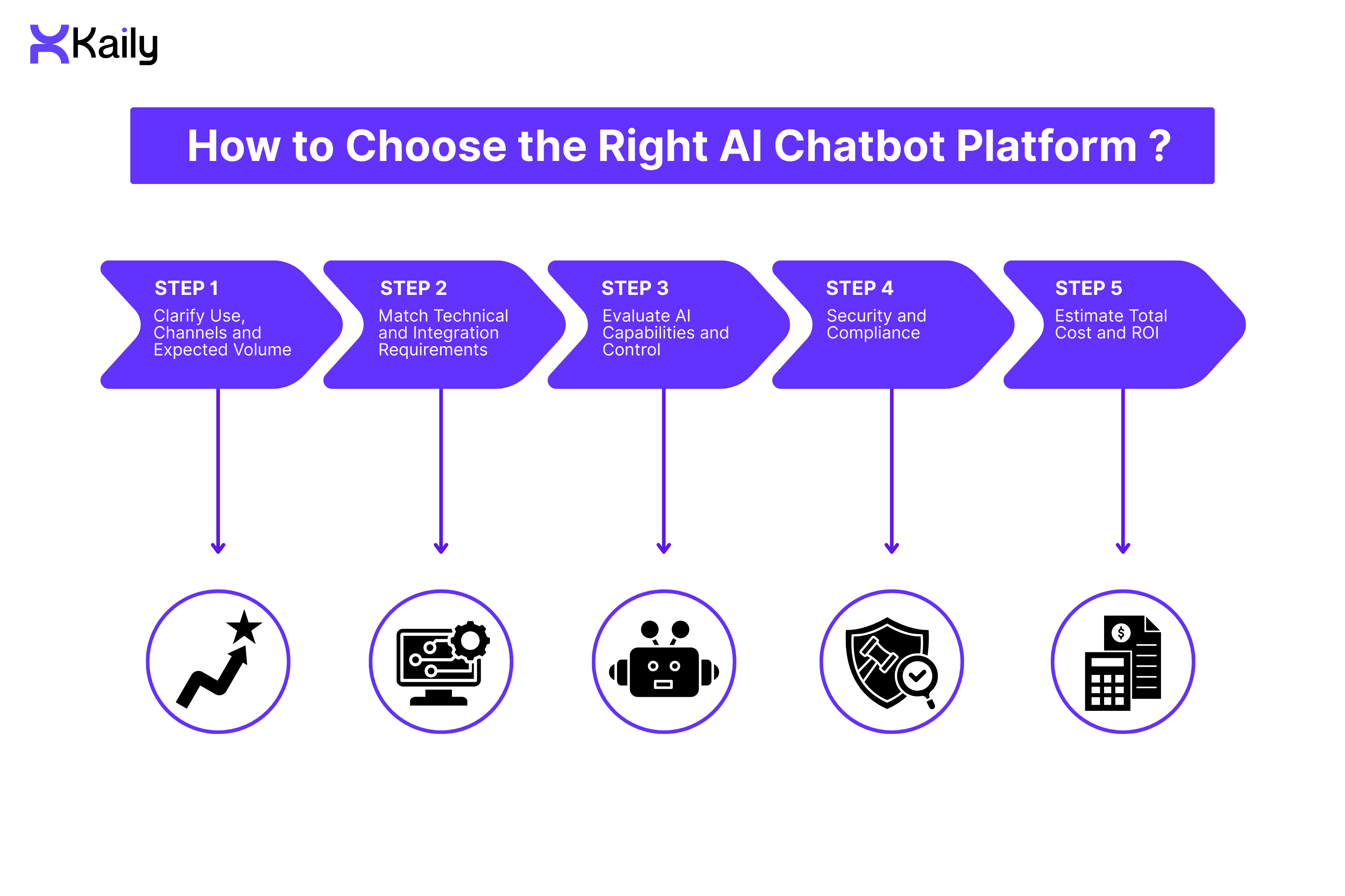
You should adopt an evidence-based approach to select a conversational AI platform.
Step 1: Clarify Use, Channels and Expected Volume
Clearly define the purpose or domain for which you want to use an AI chatbot platform. Next, estimate the inquiry volumes you expect it to handle and then specify the required languages and preferred channels: in-app chatbot, web chat, messaging apps, or voice.
This step will allow you to decide whether a simple rule-based solution will be suitable for your needs or if an LLM or hybrid platform would better meet your needs.
Step 2: Match Technical and Integration Requirements
Make sure to find out whether the platform can integrate with your current CRM, ticketing, helpdesk, ERP, webhooks, or payment systems. This is a crucial step, as a lack of integration flexibility can limit the long-term viability of such platforms.
Next, prioritize low-code platforms that offer speed and are easy to deploy. Note that custom-coded solutions can offer control, but they demand technical resources, so plan accordingly.
Step 3: Evaluate AI Capabilities and Control
If you are using LLM-powered or hybrid chatbots for your business, check for retrieval augmented generation, multi-LLM, conversation context management, and adaptive learning capabilities.
Retrieval-Augmented Generation delivers up-to-date, domain-specific responses, reducing errors, while multi-LLM capabilities allow businesses to plug in different models for speed and accuracy.
Meanwhile, conversation context management is suitable for multi-turn interactions and maintaining coherence. Notably, adopting a hybrid model for multi-turn conversations ensures high accuracy and low latency.
In the case of adaptive learning, you can expect systems to learn from interactions and refine their intent models and retrieval strategies.
In the same phase, check how different platforms handle compliance or assist content moderation, especially for sensitive domains like finance, healthcare, and education.
Step 4: Security and Compliance
If you operate in regulated domains, don't forget to check compliance norms related to auditability, consent mechanisms, privacy, and data residency alongside data governance policies.
Transparency and bias mitigation are important considerations for enterprises today when selecting conversational AI.
Step 5: Estimate Total Cost and ROI
When evaluating pricing models, break down costs by conversation, user, monthly active users, and seats. Then compare these against your use case, expected volume, and measurable business impact.
Outcomes like reduced involvement of human agents, faster resolution, business process automation and better user experience are indicators of positive returns.
In this phase, we recommend that you also factor in costs involved with maintenance, content updates and active monitoring by human agents.
Best AI Chatbot Platforms and Companies in 2026 (Ranked Top 10 List)
I. SMB-Friendly Builders
1. Kaily
It’s a no-code AI agent builder that integrates with enterprise databases, omnichannel support, workflow automation, language support, analytics and human handover support to optimise processes.
- Pros: Kaily is quick to deploy and doesn't need technical skills or deep insights for deployment. The platform integrates with live business data and offers more than FAQ-level responses to users. Its flexible support for sales, support, and automation alongside pay-as-you-use pricing makes it accessible to SMBs.
- Cons: The full feature set could be an overkill if you seek a basic FAQ bot.
- Best For: SMBs and startups that want an LLM-powered AI chatbot without writing code can use Kaily for customer support, lead generation, and automation of internal processes.
2. Intercom
This platform offers support features such as live chat, shared inbox, helpdesk, AI chatbot, automation, and CRM integration. Intercom also supports businesses' in-app web chat and email outbound channels, depending on selected add-ons.
- Pros: Intercom allows you to combine human-agent support and automation to streamline sales, marketing and support workflows. It lowers barriers to adopting chat support and implementing automation.
- Cons: Businesses could end up paying more and face limitations for heavy conversational AI needs.
- Best For: SMBs and SaaS companies that want integrated live chat, support ticketing, and AI-powered process automation.
3. ChatBot.com
It offers businesses access to a no-code chatbot builder, quick setup, insightful analytics dashboards and automation of web-based chat.
- Pros: ChatBot.com is affordable and simple to set up. It can also offer your workflow support and boost engagement.
- Cons: The platform is limited to a web-chat widget and is too simple for complex workflows, multilingual support, or deep automation needs.
- Best For: Small businesses and startups seeking a simple website chatbot for lead capture and FAQ support.
4. Appy Pie Chatbot
This platform offers a website widget, a drag-and-drop bot builder, simple workflows, FAQ templates, and supports integrations with simple tools like email and CRM-lite platforms.
- Pros: Appy Pie is easy to set up with a low learning curve. It meets basic support needs and remains affordable for small teams.
- Cons: It offers limited support for advanced automation and complex workflows. It is also not suitable for high-volume or multi-channel tasks.
- Best For: It is suitable for companies that want a simple, no-code chatbot for their websites or messaging channels.
II. Enterprise Conversational-AI Platforms
5. Kore.ai
This platform offers businesses voice and text virtual assistants, dialog management and industry-specific templates. It also offers access to analytics, tools for audit and governance, and workflow automation.
- Pros: It's good for large-scale service operations and service desks. The platform also offers strong compliance features and broad channel support.
- Cons: The setup is complex, and its pricing model and deployment are suitable for large organizations. You may also require dedicated teams to help you with configuration and maintenance.
- Best for: It is suitable for large enterprises and those operating in regulated industries.
6. Yellow.ai
It offers multi-LLM architecture, omnichannel support in text and voice format, support for 100+ languages and automation of workflows. The platform also supports customer-facing and employee-facing interactions.
- Pros: It helps businesses scale globally. The diverse language support makes it suitable for a large user base.
- Cons: Its pricing is enterprise-level and often custom..
- Best For: Yellow.ai is best for large or global companies that handle high-volume, multilingual interactions across different channels.
7. LivePerson
The platform offers omnichannel conversation support, hybrid AI and human-agent workflows, integration with contact-centre infrastructure, conversational commerce capabilities, and compliance tools.
- Pros: It allows chatbots to escalate matters to human agents and supports flexible integration with existing support systems.
- Cons: Onboarding and setup can be complex due to its large-scale deployment requirements.
- Best for: LivePerson is suitable for enterprises and contact centres that want to balance hybrid human-AI support, route conversations, and facilitate GenAI customer interactions.
8. IBM Watson Assistant
It offers enterprise-grade natural language processing (NLP) and natural language understanding (NLU), plus access to dialogue-building tools like a visual builder. The platform also allows integration with knowledge-base tools, multilingual support, data security, governance, and the ability to deploy in the cloud or on-premises for compliance.
- Pros: The platform is good for complex workflows and large-scale operations.
- Cons: Premium pricing and complex configuration can be time-consuming.
- Best for: It is suitable for large enterprises in regulated industries like finance, healthcare, and insurance that need secure and compliant conversational AI tools.
III. Developer-Centric or Open-Source Frameworks
9. Rasa
It offers an open-source conversational AI framework, dialog management, customizable natural language understanding, and integration with multiple channels or backend systems. The platform can also be self-hosted on premises, providing full control control data and privacy.
- Pros: The platform offers full control, and there’s no dependence on an external vendor. It also offers flexibility for workflow automation, custom logic, and integration.
- Cons: You would require developer resources and technical expertise for implementation. Also, the setup and maintenance are more demanding than no-code solutions, and you may need paid support to scale.
- Best for: Development teams that need maximum control over chatbot logic, conversational flows, data privacy, and custom integrations may consider Rasa.
10. Google Dialogflow
The platform supports intent and context detection and allows integration with the Google Cloud ecosystem. It also supports voice and text-based conversational agents and offers pre-built templates, cloud hosting, and integration with APIs or services.
- Pros: The platform requires low effort to build and access a working chatbot. It is also good for voice and chat support and can be scaled through Google Cloud.
- Cons: Its features can be limiting when it comes to advanced, highly customised logic or enterprise-grade security or data control. Scaling it could also be expensive.
- Best for: Teams needing conversational interfaces for chat or voice without building backend infrastructure from scratch.
Chatbot Comparison Summary
How to Choose the Right Platform in 30 Seconds
First, define your business size and operation complexities and ask -
- Are you a large enterprise that has a global user base or deals with high volume?
If yes, explore Yellow.ai or LivePerson for multilingual support and automation at scale.
If you need strict compliance, check IBM Watson Assistant.
- Are you a new startup or SME?
If you seek a fast, no-code setup, consider Kaily.
But if you need just a simple chatbot for your website, check out ChatBot.com or Appy Pie.
- Need the top-notch customer experience and AI for SaaS?
Check the features that come with Intercom.
- Are you aiming to build a custom workflow with the support of your in-house developer?
Rasa could fit your needs.
- Do you need voice bots or Google Cloud integration?
Check Dialogflow’s flexible features.
Implementation Roadmap: From Pilot to Scale
- Phase 1: Discovery and Design
Chalk out the entire user journey, common questions, intents, and possible decision trees. Next, identify the automation level you want to achieve. For instance, determine whether you want workflow-based tasks, natural language responses, or FAQ-style replies.
Next, set clear business goals that you expect the chatbot tool to support. You could aim to speed up resolution time, improve lead quality, or reduce the load of the support team.
After this, gauge the readiness of your existing backend systems, like ERP, CRM and database, for integration. In this phase, make sure to assess compliance and privacy requirements and audit needs for enterprise chatbots.
- Phase 2: Build, Integrate and Test
Once you decide on a rule-based, retrieval-based, or hybrid bot, integrate the desired backend systems so that they can fetch data as and when needed without any intervention.
In this phase, it is important that you define when the chatbot should escalate a situation to a human agent. Most businesses flag complex queries, ambiguous input, and compliance-sensitive questions as instances when human handoff logic would be required.
Next, conduct testing that goes beyond ideal flows. Make sure to test edge cases, error handling, fallback logic, etc., to gain better insights. Additionally, run a user acceptance test with a small group of representative users and then evaluate performance, accuracy, compliance and handoffs.
- Phase 3: Launch, Measure and Iterate
Deploy chatbots to chosen channels in a phased manner. You may start with tracking conversations, fallout rates, drop-offs, and escalation frequency.
As the next step, review the performance regularly, and based on the feedback, update the knowledge base, refine the flow and prompts and retrain models, if required. This step will also help you understand whether your chosen metrics align with business goals such as cost reduction, lead conversions, revenue, and support load.
In this phase, conduct audits and compliance checks to ensure you are able to maintain data security and governance. Additionally, for long-term maintenance, invest in content updates, intent detection and infrastructure.
Once you link your business goals with each implementation phase, you will achieve better success than ad hoc chatbot efforts.
Common Pitfalls and Best Practices
Best Practices
- Continuous training and monitoring
It is important that you avoid the “set and forget” mentality when it comes to AI chatbots, as they require regular training and oversight to deliver quality outcomes.
Continuous training of intent-decision models, updating knowledge bases, and reviewing analytics helps AI chat agents to offer relevant and quality responses that suit users’ evolving business and behavior.
- Design for escalation
Expecting chatbots to handle everything can hamper implementation. Make sure to design a clear human handover path for bots to follow. This will enable bots to escalate complex, hard-to-interpret queries and compliance-related concerns to human agents.
- Align KPIs with business goals
Track bot-centric metrics and connect chatbot performance to broader business outcomes. Monitor the number of chats, response time, cost savings, reduced burden on the support team and conversion rates to understand whether the chatbot is helping you meet your business goals or just supporting tactical automation.
- Integrate chatbot with backend systems
To deliver personalized responses, track transactions and monitor the status of lead generation and sales, connect the chatbot to CRM, support systems, databases and other crucial backend systems. Skipping this can leave you stuck with generic responses.
- Start small
Start with narrow use cases and gradually scale the deployment to understand initial feedback and gaps better. This will help you to test design assumptions and refine integration before scaling up.
Common Pitfalls and Risks
- Overestimating chatbot adoption
Not every user is comfortable with chatbots. So even when AI chatbots are efficient, they may choose to interact with human agents.
- Algorithm aversion
Some users tend to avoid AI chatbots, as they suspect they will receive an imperfect initial response and a delayed handover to a human agent. This gatekeeper effect often lowers the adoption rate among users, even when bots are easily accessible and available.
- Poor context-handling
Sometimes chatbots can misinterpret user intent or struggle to handle nuanced queries. This is more common in chatbots that rely on limited training datasets or predefined knowledge sources.
- Privacy, compliance and data security
Ignoring encryption, data governance, consent, audit trails and compliance can lead to data breaches. To avoid regulatory risks, companies must safeguard sensitive data.
- Assuming AI chatbots can replace human agents
Chatbots are well-suited for routine, simple tasks but struggle with complex interactions. To ensure customer experience is top-notch, businesses should blend the best of AI chatbots to automate responses and have a team of human agents to address sensitive queries.
AI Chatbot Platforms vs. Human Agents
AI chatbot platforms perform efficiently when they work in sync with a team of human agents. That's why more businesses are balancing these four aspects when deploying a conversational AI for their workflows:
- Conversational or cognitive intelligence
- User experience
- Regulatory or ethical compliance
- Operational efficiency
Human support agents backed by AI assistance can see an increase in their productivity. AI agents take care of routine tasks and common queries without the need for human agents to intervene, which, in turn, improves productivity and supports scalability.
Human agents step in only when chatbots escalate complex topics or concerns, which need empathy and understanding. This balance helps customer support teams solve queries faster and address fewer tickets.
Additionally, many users feel dissatisfied when served entirely by AI chatbots instead of expert human agents. It also bothers users who seek unique insights into their concerns and are not pleased with generic responses. Such experiences leave users dissatisfied and at the same time suggest that AI cannot replace human agents and must complement them for operational efficiency.
That's why businesses are adopting hybrid models where chatbots handle high-volume, repetitive tasks, leaving human agents to resolve complex matters.
This means organizations choosing to deploy chatbots should see the process as a project and start it in a phased manner with defined use cases. Businesses that invest in design and integration, monitor performance, and implement feedback can ensure customer satisfaction and quality responses.
However, to maximize AI chatbot effectiveness and ensure they complement human agents, businesses must set realistic expectations. Combine their strengths to speed resolution time, lower cost, scale growth, and improve retention. By implementing an efficient AI chatbot platform, you can achieve these benefits more easily.
Build your first AI chatbot in minutes!
Talk to team Kaily for live chat and chatbot integration.













.png)

