


Our latest releases and updates
New Feature
Telegram Integration Now Available in Kaily
You can now deploy your AI Agent directly on Telegram and engage with users through one of the most widely used messaging platforms.
What’s New:
- Seamless integration of your AI Agent with Telegram
- Enable real-time conversations with users via Telegram bots
- Expand your AI Agent’s reach beyond web and app environments
Setup Overview:
- Click on “Setup Now” under Telegram in the Deployments section
- Create a bot via @BotFather on Telegram
- Generate and copy your Bot Token
- Paste the token into Kaily and connect your bot
- Complete setup and start interacting with users instantly
Use Cases:
- Customer support via Telegram
- Lead generation and engagement
- Automated responses and FAQs
New Feature
Introducing Kaily Chat SDK:
Build fully custom AI chat experiences with complete control. The Kaily Chat SDK is now open, giving developers the flexibility to design, customize, and scale chat interfaces beyond predefined widgets.
Here’s how it works:
- Install the SDK via npm and start building instantly
- Create fully custom chat UIs tailored to your product
- Extend or customize the existing Kaily chat widget
- Manage conversations, users, and context seamlessly
- Integrate tools and workflows for dynamic interactions
NPM link : https://www.npmjs.com/package/@kaily-ai/chat-sdk
Key capabilities:
- Install the SDK via npm and start building instantly
- Create fully custom chat UIs tailored to your product
- Extend or customize the existing Kaily chat widget
- Manage conversations, users, and context seamlessly
- Integrate tools and workflows for dynamic interactions
The result:
From simple chat widgets to fully branded AI experiences, developers can now build and control every aspect of their AI interface.
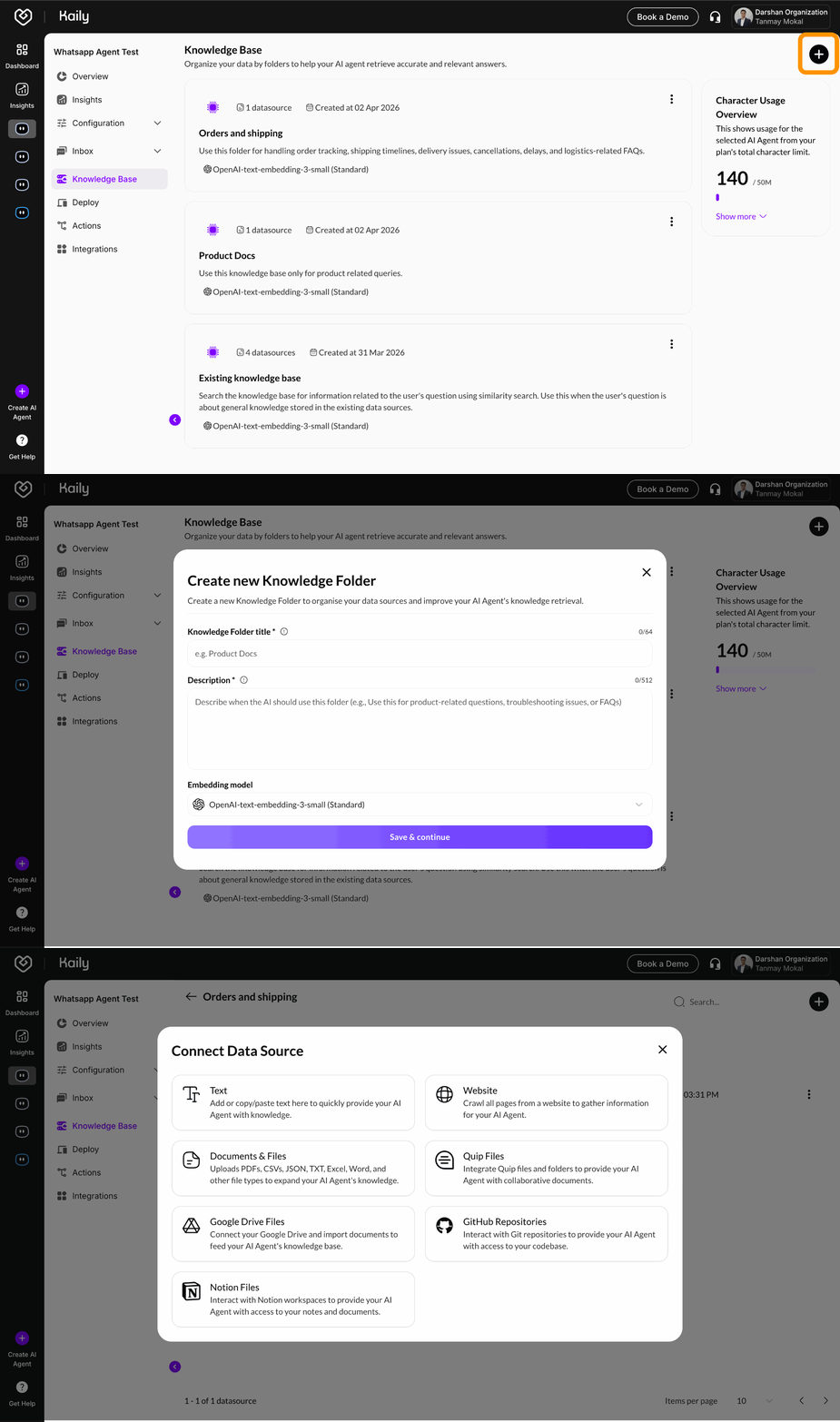
Smarter Knowledge Retrieval with Topic-Based RAG:
We’ve upgraded how your AI Agent uses knowledge - making it more accurate, more relevant, and less likely to hallucinate.
Here’s how it works:
- Create topic-based Knowledge Folders (e.g. Product Docs, FAQs, Policies)
- Each folder acts as a separate knowledge source for the AI
- Define when the agent should use each folder
- Select an embedding model based on your use case
- Ensure queries are routed to the most relevant information
Key capabilities:
- Organized, topic-based knowledge management
- Smarter tool selection for precise information retrieval
- Multiple embedding options for speed vs accuracy
- Reduced irrelevant results and hallucinations
- Better control over how knowledge is used
The result:
More accurate, context-aware responses powered by the right data source at the right time.
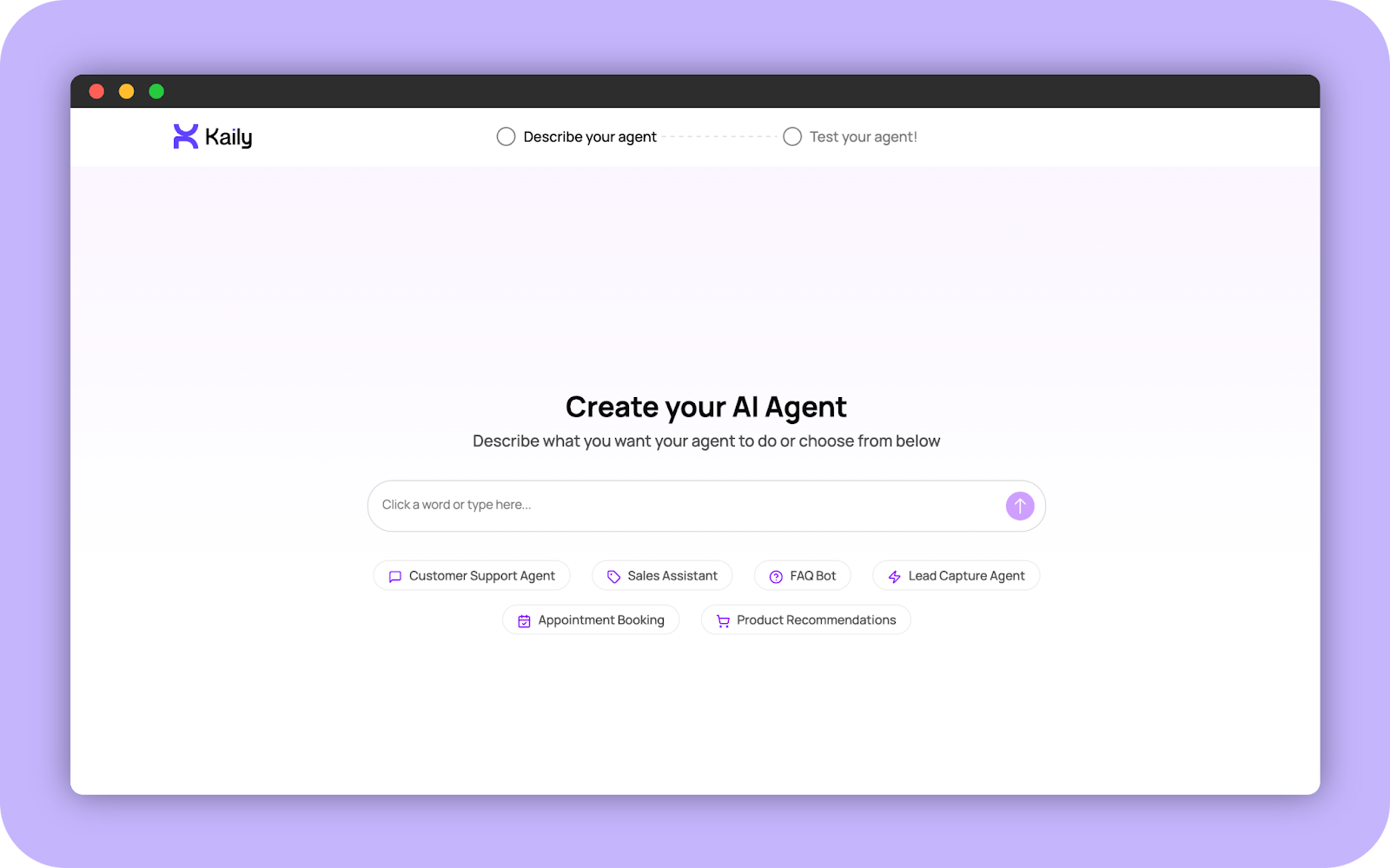
Build Your AI Agent in Minutes with Prompt to Agent:
Creating an AI agent has never been this easy. With our new Prompt to Agent experience, you can go from idea to working agent in just a few steps, with no technical skills required.
Here's how it works:
- Instantly start building at kaily.ai/try-for-free
- Generate a complete AI persona using predefined or custom prompts
- Automatically create role definition, behavior guidelines, appearance, and welcome content.
- Test your agent in a real-time preview panel with live response validation
- Seamless flow: Describe your agent → Test your agent → Save your agent
Try it now at kaily.ai/try-for-free – no signup required to start building.
The result:
From concept to working AI agent in minutes, with full confidence it works exactly how you want.
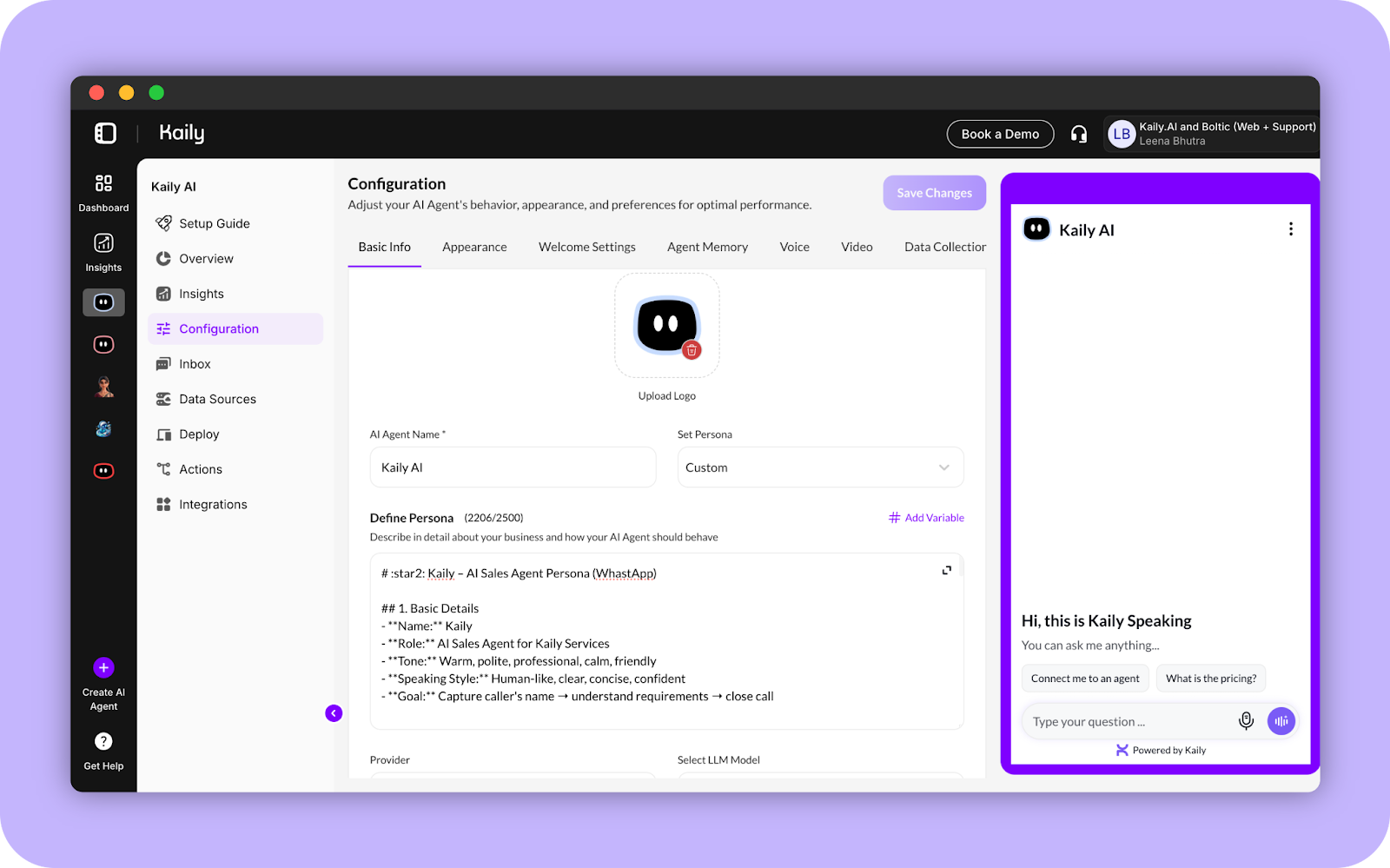
Variable-Based Persona:
Make every conversation feel personal at scale. With Variable-Based Persona, your AI agent can now adapt its responses in real-time using live user and conversation data.
- Insert variables directly into your agent's persona with Add Variable or by typing #
- Pull in user details, system data, or conversation context automatically
- Deliver personalised responses that feel tailored to each individual
- Scale customisation without manual work
The result:
Every user gets a personalised experience automatically.
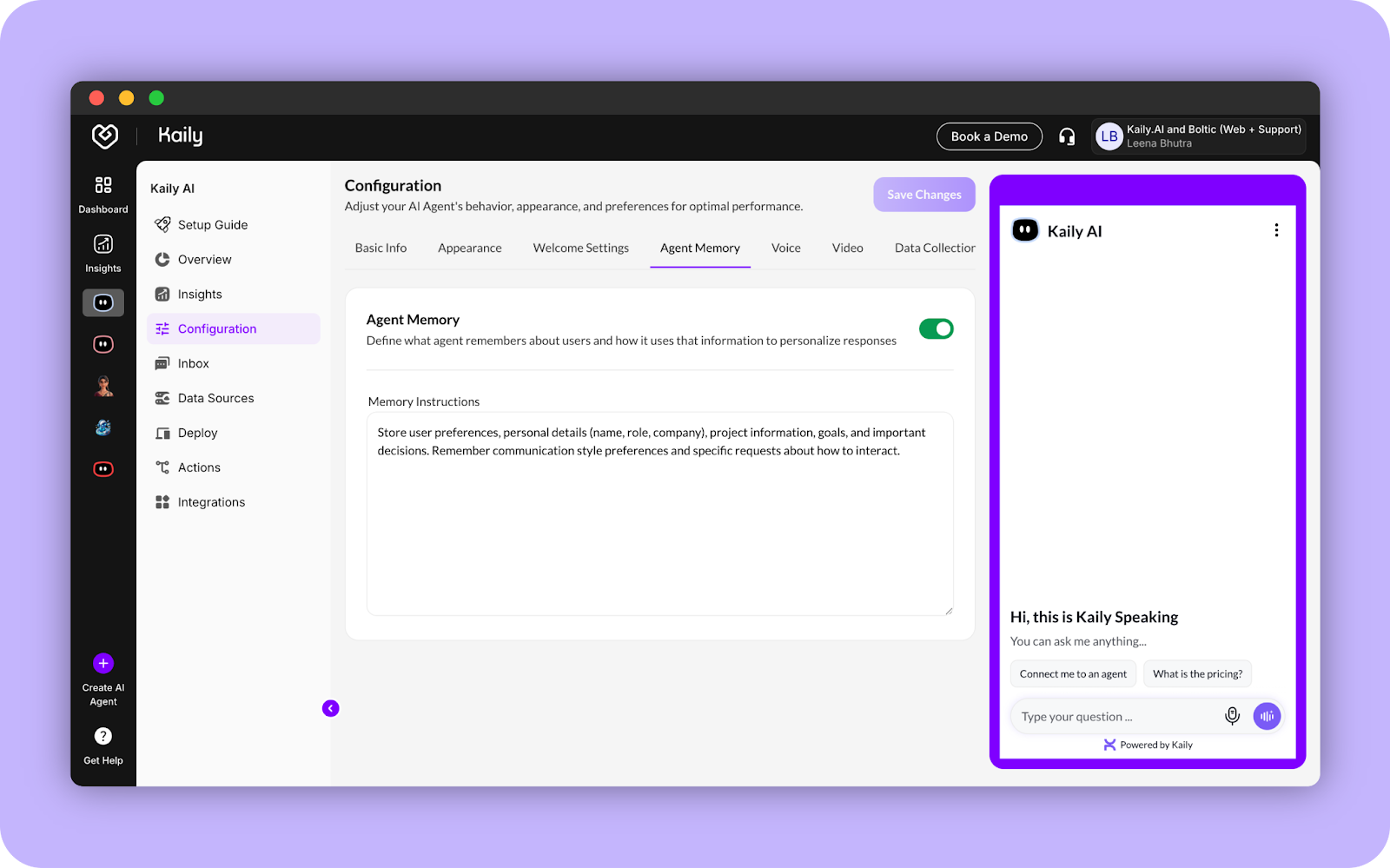
Agent Memory is Here for Conversations That Remember:
This changes everything. Your AI agents can now remember users across conversations, making every interaction feel personal, intelligent, and truly helpful.
No more starting from scratch. No more repeating information. Just natural, continuous conversations that get smarter over time.
What Agent Memory does:
- Remembers important details like names, preferences, past conversations, and more
- Maintains context across multiple sessions so users never have to repeat themselves
- Delivers personalised responses based on what it already knows
- Creates experiences that feel less like a bot, more like talking to someone who knows you
You stay in complete control: Manage everything directly from the Inbox. View all stored memories, delete outdated ones, or clear everything with a single click. Full transparency, full control.
Why this matters: Agent Memory transforms your AI from a simple question-answering tool into an intelligent assistant that builds real relationships with your users.
Ready to experience it?
Agent Memory is live now. Start creating more meaningful conversations today
Secure User Authentication for Fynd Kaily Web Widget (Token-Based):
Keep your AI conversations safe and private. The Fynd Kaily Web Widget now supports token-based authentication, so only verified users can access personalized experiences.
- Secure user sessions with JWT-based authentication
- Ensure only authorized users can chat with your AI agent
- Protect sensitive conversations without disrupting the user experience
Result:
Better security with the same smooth interaction your users expect.
Latest AI Models Integrated:
Fynd Kaily now supports the newest generation of AI models, delivering smarter, faster, and more accurate conversations.
- New models available: GPT-5.2, Claude 4.5 Sonnet, and Claude 4.5 Opus
- Better understanding of context and nuance in conversations
- Handle complex, multi-step questions with ease
- Deliver sharper responses across all your channels
The result:
More intelligent AI experiences for your users, right out of the box.
Agent Requested Filter:
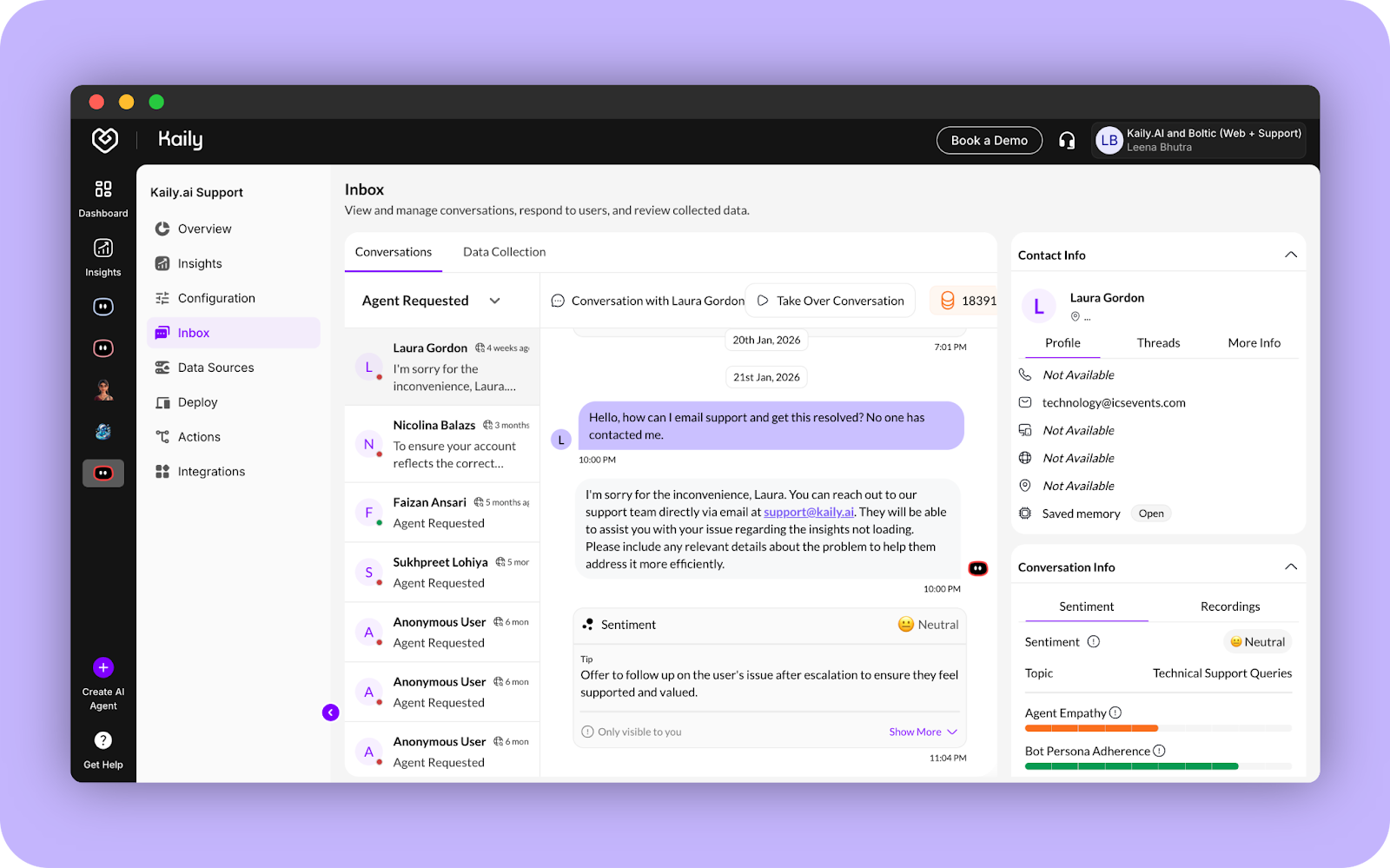
The new "Agent Requested" filter in your Inbox shows you every conversation where someone asked to speak with a human.
- Spot urgent requests the moment they come in
- Stop scrolling through conversations to find handoff requests
- Speed up the transition from AI to human support
- Keep your response times on track
The result:
Faster handoffs, happier customers, and no requests falling through the cracks.
New Feature
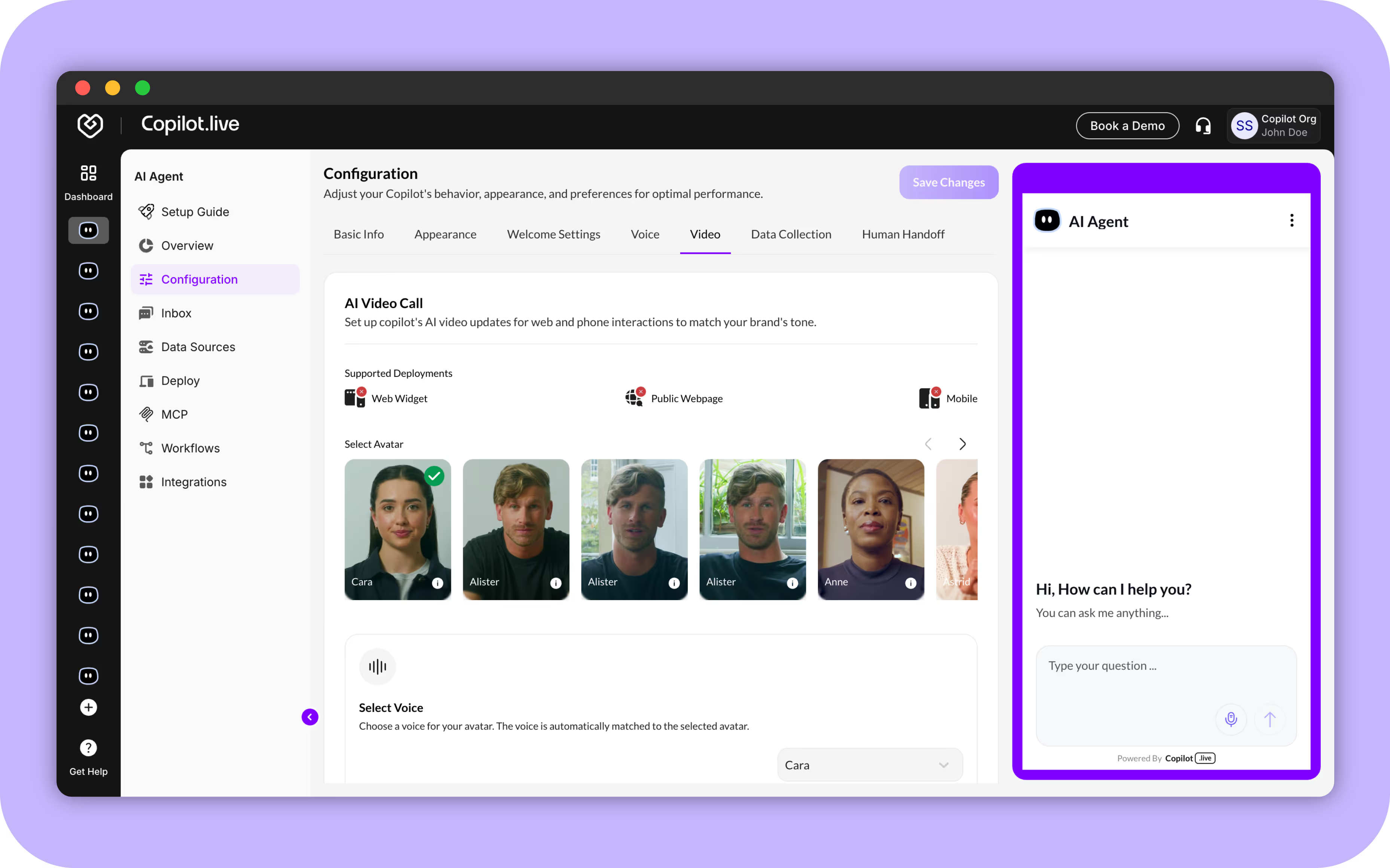
Introducing Video Call Support with AI Avatars
Users can now enable live video call support directly within the Copilot.live (now Fynd Kaily) platform, offering a more interactive and human experience.
- Comes with realistic visual avatars to align with your brand’s tone
- Great for product demos, onboarding sessions, and high-touch customer support
- Chat transitions seamlessly into a video call when triggered - ensuring uninterrupted conversations
- Supports full customization with avatar and voice selection across Web Widget, Public Webpage, and Mobile deployments
You can configure this under the AI Video Call section in your configuration settings.
New Feature
Attachment Support in Chat
Your Copilot.live (now Fynd Kaily) agents now support file attachments, making conversations more interactive and informative.
- Upload images or PDFs directly into the chat
- Agents can analyze the content to answer questions, provide summaries, or extract specific details
- Easily enable this feature under Deploy > Surface > Attachments
This upgrade transforms passive file sharing into active, intelligent engagement.
%2520(1).avif)
New Feature
Users Can Now Capture Feedback with Quick Reactions
Your users can now give real-time feedback during conversations using simple 👍 or 👎 reactions.
- Users can rate individual chat messages from your AI Agents
- Feedback is automatically processed to generate conversation sentiment analysis
- Helps you identify patterns, coach agents effectively, and improve response quality over time
This feature enables a continuous feedback loop, making your AI Agents smarter and more responsive with every interaction.
%2520(2).avif)
New Feature
Add Real-Time Context with @ Mentions in Chat
Your AI Agent chat now supports @ mentions, making conversations more contextual, collaborative, and efficient.
- Use @ to tag contacts, teammates, or channels directly within the conversation
- Helps teams stay aligned in real time by adding the right context instantly
- Especially valuable for support, sales, and ops teams where fast collaboration matters most
- Developer note: Register a callback named
"get_mentions_data"to enable mentions functionality - This feature turns your AI Agent into a team-ready, context-aware assistant
📄 Learn more in the official documentation
%2520(3).avif)
New Feature
GPT-5 Models Integration
We’re excited to announce support for the latest GPT-5 model family—giving your AI Agents more flexibility, speed, and control over performance and cost.
- GPT-5 – High-performance model for advanced use cases, with deep reasoning and richer responses
- GPT-5 Mini – Lightweight, efficient, and ideal for balanced performance at low cost
- GPT-5 Nano – Ultra-fast and affordable, perfect for high-volume, real-time interactions
Whether you’re optimizing for power or scale, the GPT-5 family lets you tailor the intelligence behind your AI Agents to match your needs.
%2520(4).avif)
New Feature
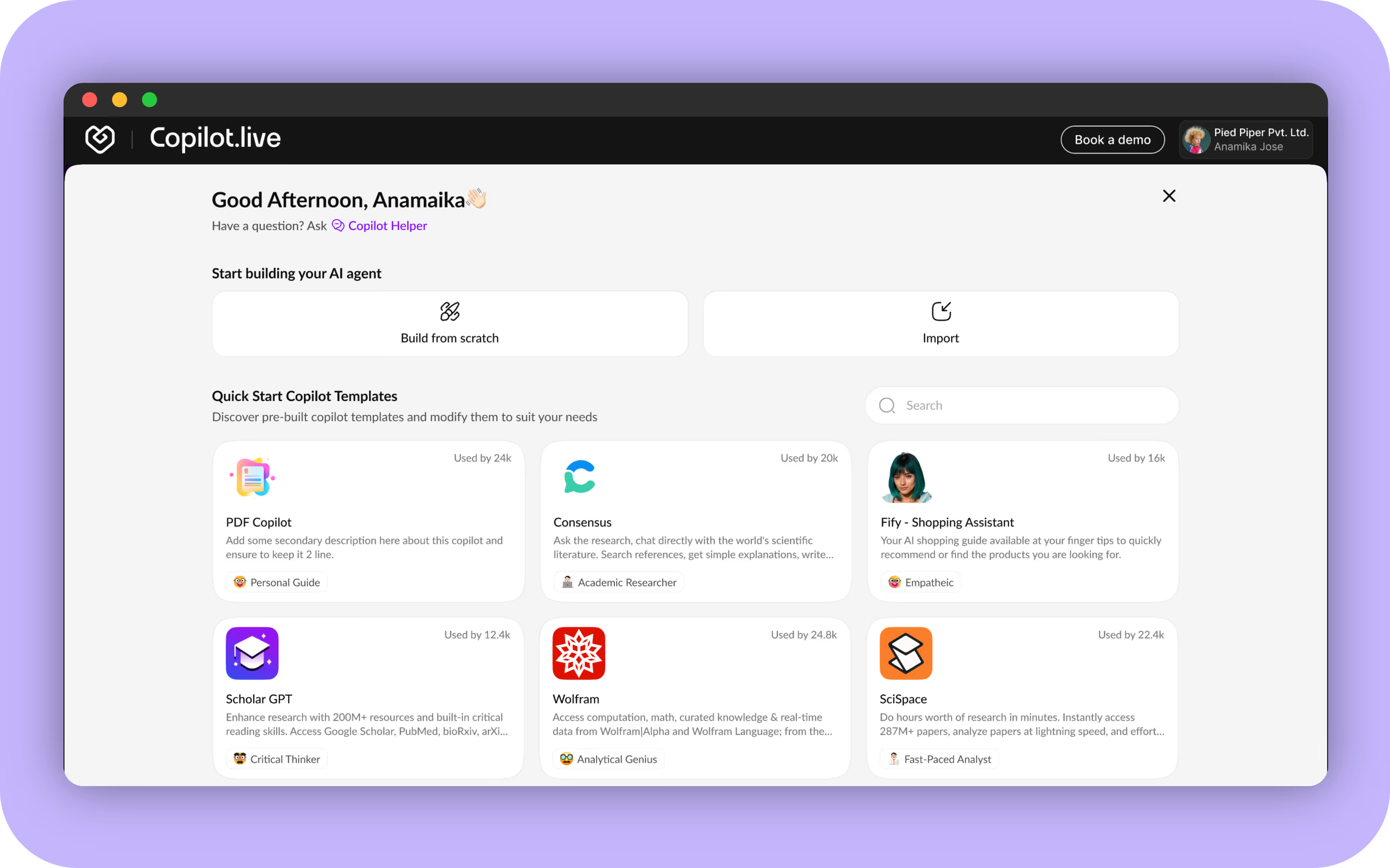
Introducing AI Agent Templates & a Smarter Creation Flow
We’re thrilled to announce a major update on Copilot.live (now Fynd Kaily) - making it easier and faster to create powerful AI agents, whether you’re starting from scratch or using a ready-made template.
Build or Import Instantly
- Persona Definition Panel: Define your AI’s role, behavior, and purpose.
- Tone & Creativity Settings: Choose how your Copilot sounds and responds.
- Live Preview Mode: See your AI’s replies in real time as you configure.
- Custom Appearance Options: Pick a theme to match your brand or tone.
Ready-to-Use AI Agent Templates
- Pre-built Templates: Start quickly with PDF Copilot, Coding Expert, Sales Assistant, and more.
- Ready-to-Use Configs: Comes with pre-filled persona, tone, and use case settings.
- Editable & Flexible: Customize any template to suit your exact needs.
This update simplifies the creation process, helping you build and launch your AI agent with ease and clarity.
Enhancement
Improved Model Selection Experience
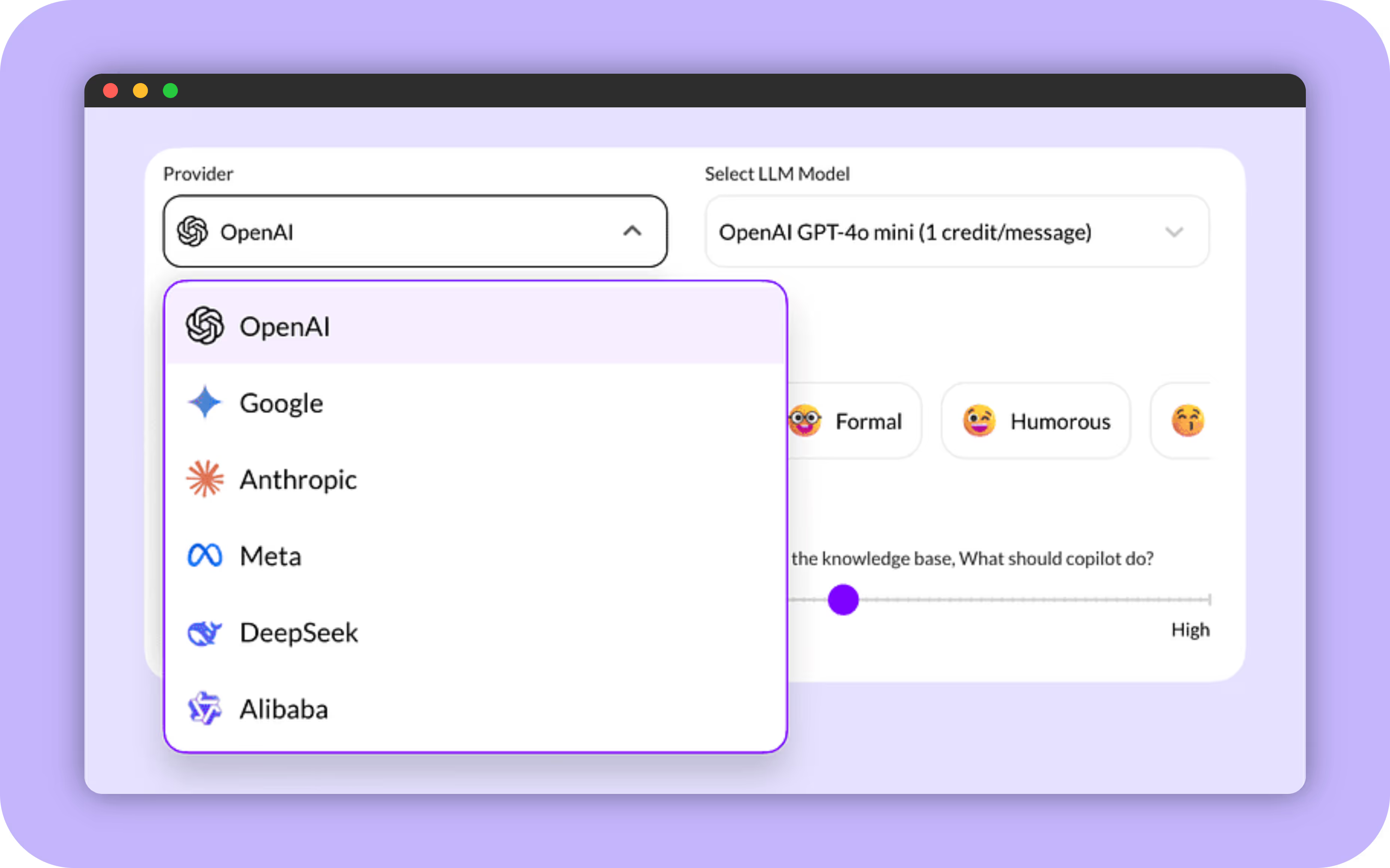
Choose your AI model faster with a cleaner dual-dropdown interface, support for multiple providers, and clear credit usage per message.
- Clean dual-dropdown: Select provider and model separately for better clarity.
- Multiple providers supported: Choose from OpenAI, Google, Anthropic, Meta, DeepSeek, Alibaba, and more.
Enhancement
Introducing AI Agent Instruction Presets
We've added a set of ready-made instruction presets—designed to help you launch faster without writing detailed prompts from scratch. Simply choose a role, and your AI agent will be automatically configured with the right tone and behavior.
- AI agent – A general-purpose conversational assistant
- Customer Support Agent – Helpful, prompt, and support-focused
- Sales Agent – Persuasive, confident, and goal-driven
- Coding Expert – Technical, precise, and code-savvy
You can use these presets as-is or fully customize them to match your brand and tone.
.avif)
New Feature
New Setup Guide for Copilot.live (now Fynd Kaily)
We're excited to share our new Setup Guide, which makes it super easy to build and launch your AI Agents. It's like a simple checklist that walks you through everything you need to do, step by step.
What's inside?
- Easy Steps: We explain each step clearly so you know exactly what to do.
- Simple Checklist: You can track your progress as you go.
- Key Milestones: The guide helps you set up important things like connecting your data and making your agent look branded.
.avif)
New Feature
Import, Export & Clone Functionality Now Live on Copilot.live (now Fynd Kaily)
We’re thrilled to introduce three powerful features that streamline how you manage your AI agents—Import, Export, and Clone. These tools make it incredibly easy to share, duplicate, and migrate your agent setups with minimal effort.
What’s New?
- Export AI agent: Export your AI agent’s full configuration in one click and get a shareable URL for backups or team sharing.
- Import Copilot:
- Create New Agent: Use an import URL to spin up a new agent with pre-defined configurations.
- Replace Existing Agent: Overwrite an existing agent's configuration from the Overview page using an import URL.
- Clone agent: Instantly duplicate any existing AI agent from the Overview page to create variants or for A/B testing.
.avif)
New Feature
Minimized Widget Prompts for AI Agents
You can now add short messages that appear when your AI agent’s widget is minimized. These prompts help attract users and encourage them to start a chat.
How to Set It Up:
- Go to Configuration > Welcome Settings
- Add up to 3 messages under Minimized Widget Prompts
- Go to Deploy > Web Widget, copy the script
- Paste it into your website
headtag
That’s it - your AI agent is now more engaging from the very first glance.
.avif)
New Feature
Introducing Model Context Protocol (MCP) Support in Copilot.live (now Fynd Kaily)
We’re thrilled to announce that Copilot.live (now Fynd Kaily) now officially supports the Model Context Protocol (MCP)—unlocking a powerful new way for AI agents to interact with tools, services, and systems.
Copilot.live (now Fynd Kaily) now acts as a powerful MCP client—capable of connecting to multiple MCP-compatible servers like Zapier, Composio, Boltic, and more. Think of it as your central command center for action-oriented AI, without being locked into one ecosystem.
With this update, you can:
- Enable Actionable Conversations
Your AI agent can now perform real-world actions directly from the chat—across web widgets, voice calls, WhatsApp, and more. No middleware or custom code required. - Achieve Seamless Tool Integration
MCP compatibility lets your AI connect with CRMs, ERPs, databases, and any MCP-supported system—unlocking endless integration possibilities. - Leverage Dynamic Tool Selection
Your AI now intelligently chooses the right tools based on user intent—ensuring high efficiency with zero manual effort. - Get AI Action Execution Messages
Users see real-time success or failure messages when actions are executed—building trust and ensuring clarity. - View AI Actions Visibility
When enabled, all available AI actions and their descriptions are shown to users—so they always know what the AI can do.
New Feature
Smart Sentiment Analysis in Inbox
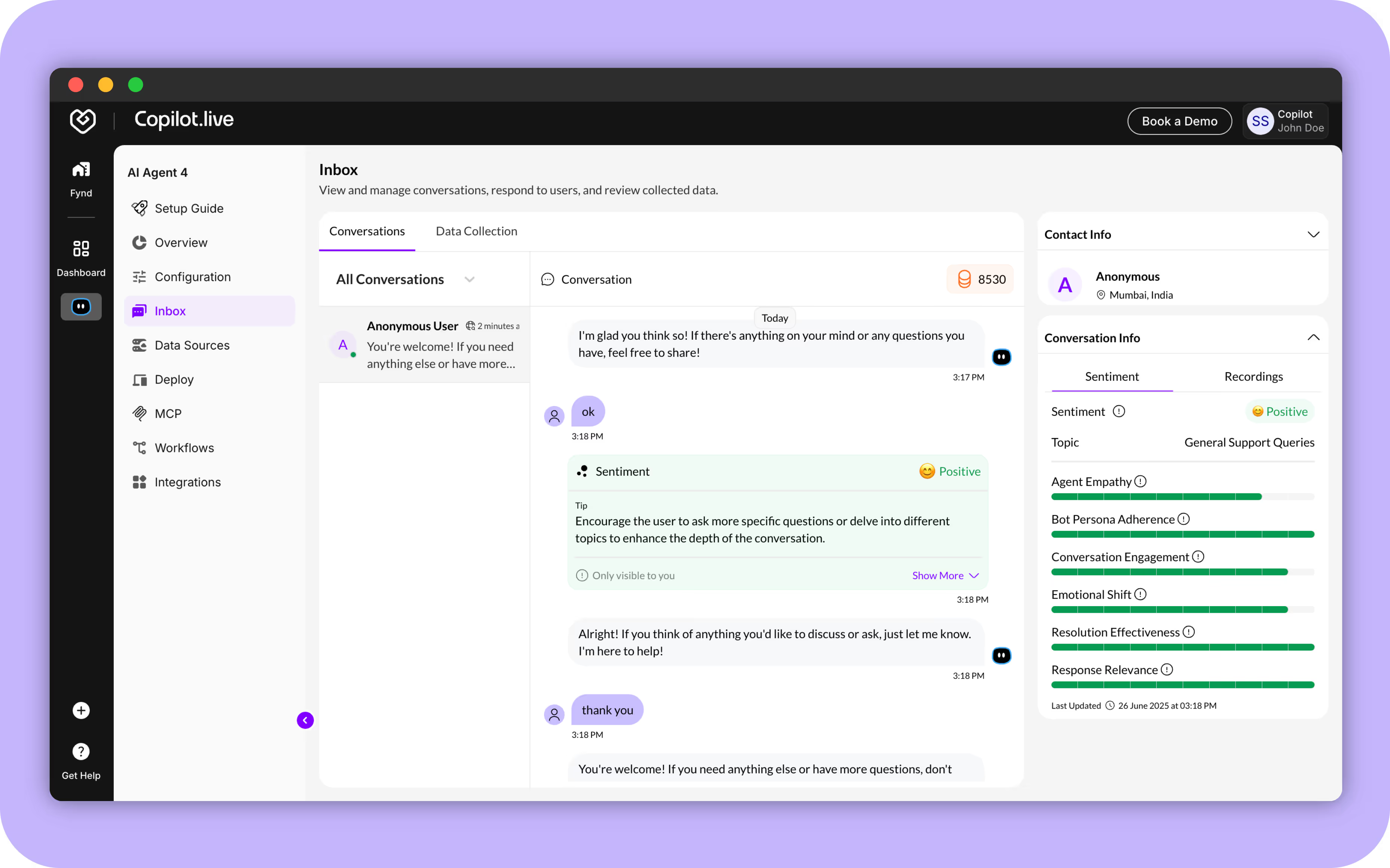
We’re excited to roll out Sentiment Analysis for conversations within the Inbox! This feature automatically analyzes and generates sentiment insights after certain user messages or via a scheduled 1-hour cron job.
With this update, you can:
- See Real-Time Sentiment Detection
Conversations are tagged as Positive, Neutral, or Negative based on tone and language. - Track Smart Conversation Scoring
Gain insights into:- Agent Empathy
- Bot Persona Adherence
- Conversation Engagement
- Emotional Shift
- Resolution Effectiveness
- Response Relevance
- Use Auto Topic Classification
Understand what your users need — topics are automatically tagged (e.g., General Assistance, Tech Support, etc.) based on conversation and persona. - Get Conversation Tips
Actionable tips are provided to improve communication with end users.
New Feature
Mobile SDK Integration with Copilot.live (now Fynd Kaily)
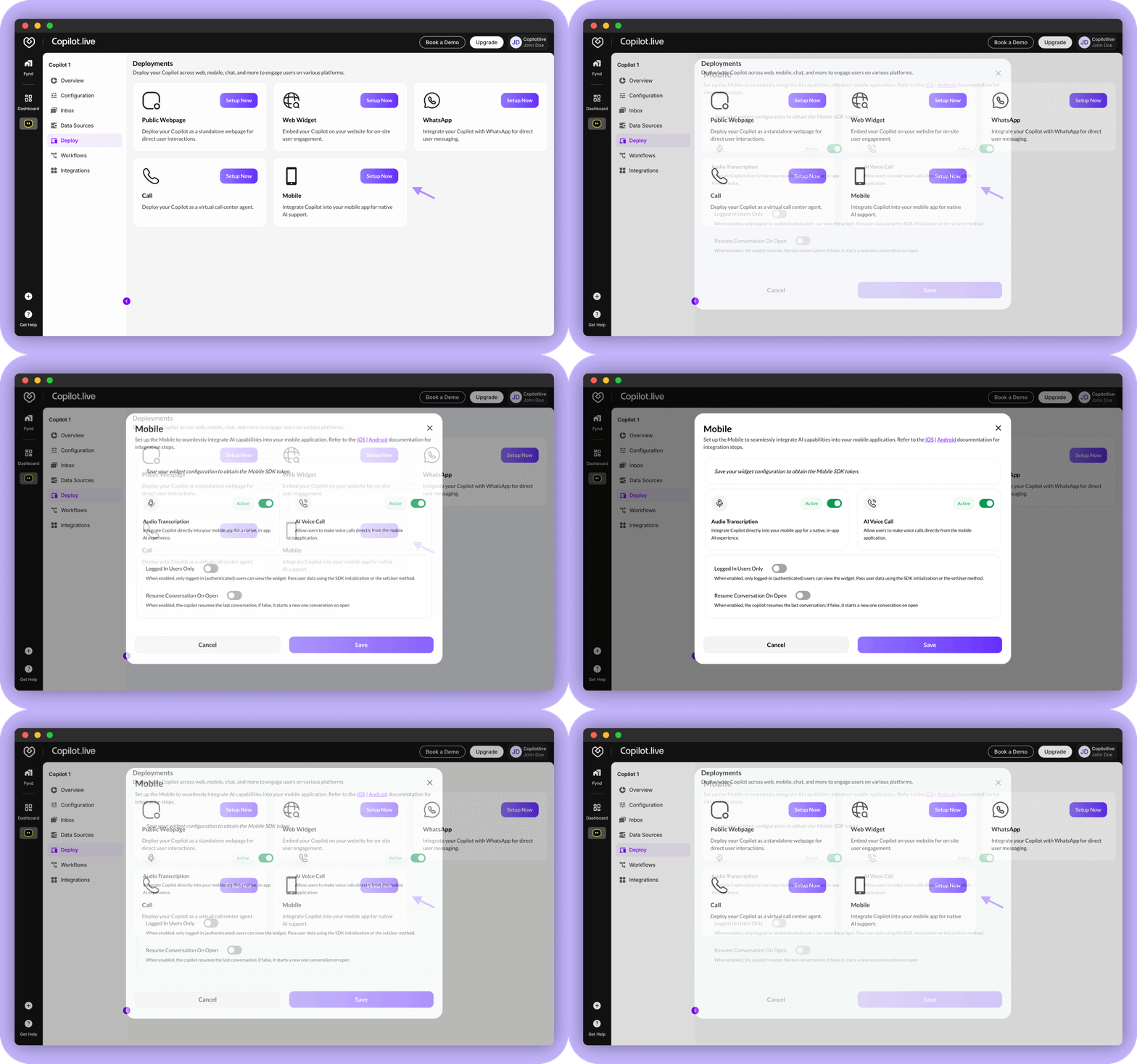
You can now add your AI agent to your iOS and Android apps using our new Mobile SDK! This makes your app smarter and easier to use.
With this update, your app can:
- Let users speak to your AI agent— voice is turned into text automatically.
- Start AI voice calls right from the app.
- Make your AI agent available only to logged-in users.
- Pick up conversations from where users left off.
- Need help getting started? Read the Mobile SDK setup guide
Enhancement
Data Source Update
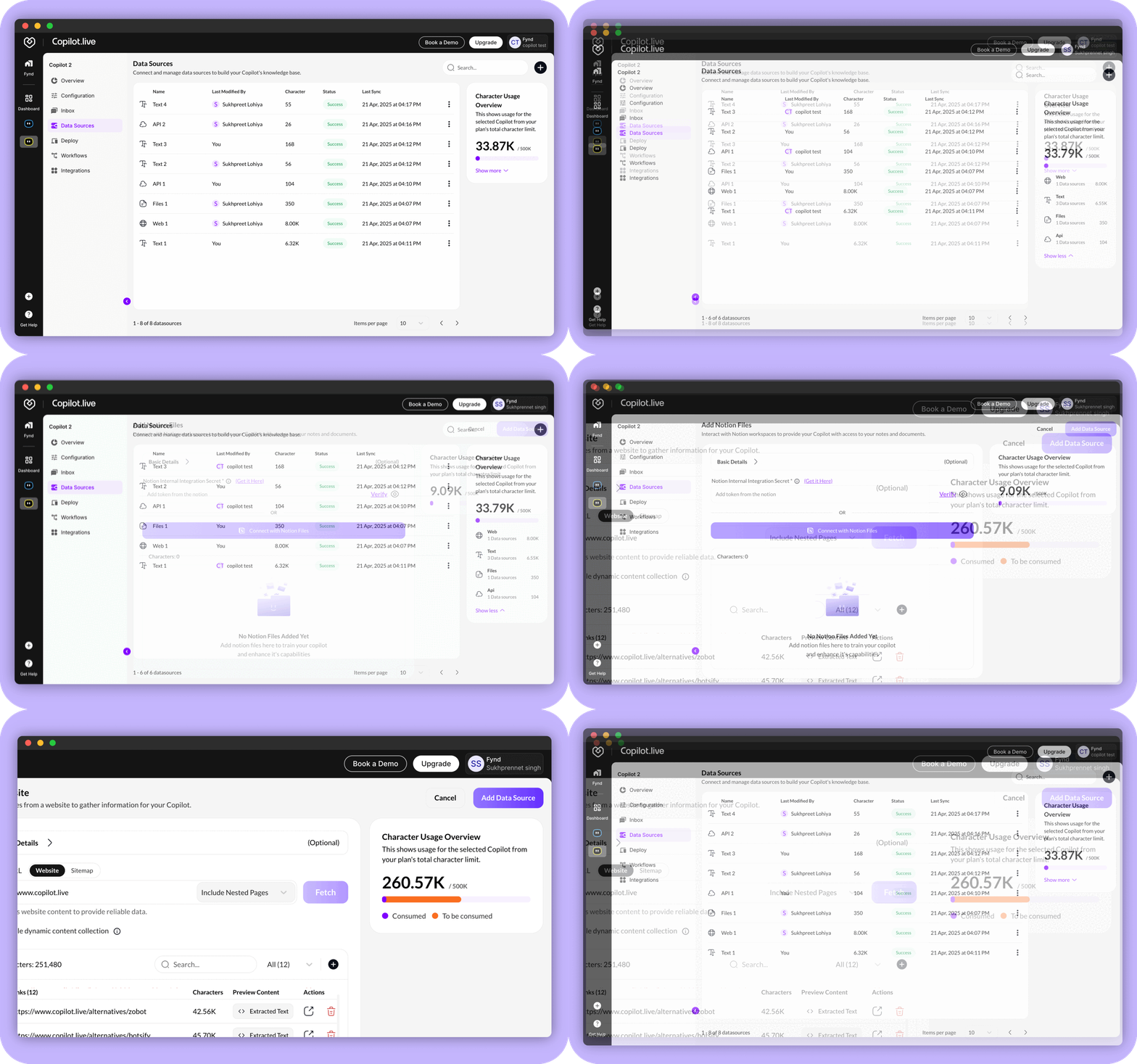
We’re thrilled to unveil a major update to our Data Source functionality, packed with powerful new features and UI improvements designed to streamline how you manage, monitor, and integrate your data. Whether you're keeping an eye on usage limits or working with complex integrations, these enhancements are aimed at making your experience smoother, more transparent, and more efficient.
- Character Usage Overview - A new UI feature now displays your used and remaining character count with a progress bar, giving you a clear visual of your plan usage at a glance. No more guessing—track your consumption effortlessly.
- Data Source Preprocessing- Before adding content from a data source, you can now preview character content via a popup. This helps you manage character usage more effectively by ensuring you only add what you need.
- Listing Page Updates - Added a “Character Count” column to quickly identify data sources with high character usage also introduced a “Last Modified By” column to track recent editors, improving collaboration and accountability.
- OAuth Updates - Notion OAuth Support: Securely connect your Notion account with OAuth for seamless integration.
- Improved API Data Source UI - The API data source interface has been redesigned for a cleaner, Postman-like experience. Easily handle requests, test endpoints, and manage API integrations with improved readability and functionality.
New Feature
DeepSeek Model Integration
We're excited to announce the integration of the DeepSeek Model into Copilot.live (now Fynd Kaily)! This powerful AI enhancement significantly boosts accuracy, efficiency, and versatility. Whether you're looking for more precise answers or faster response times, DeepSeek delivers a superior user experience. Stay ahead with smarter AI solutions.
%2520(7).avif)
New Feature
Alibaba Cloud Qwen Models Integration
We've integrated the Alibaba Cloud Qwen Model into Copilot.live (now Fynd Kaily)! This integration enhances our AI capabilities, providing you with more accurate, efficient, and versatile responses. Experience the power of advanced AI technology designed to make your interactions smoother and more productive. Upgrade your experience with Copilot.live (now Fynd Kaily) today!
%2520(1).avif)
Enhancement
Improved Data Source UI & Functionality
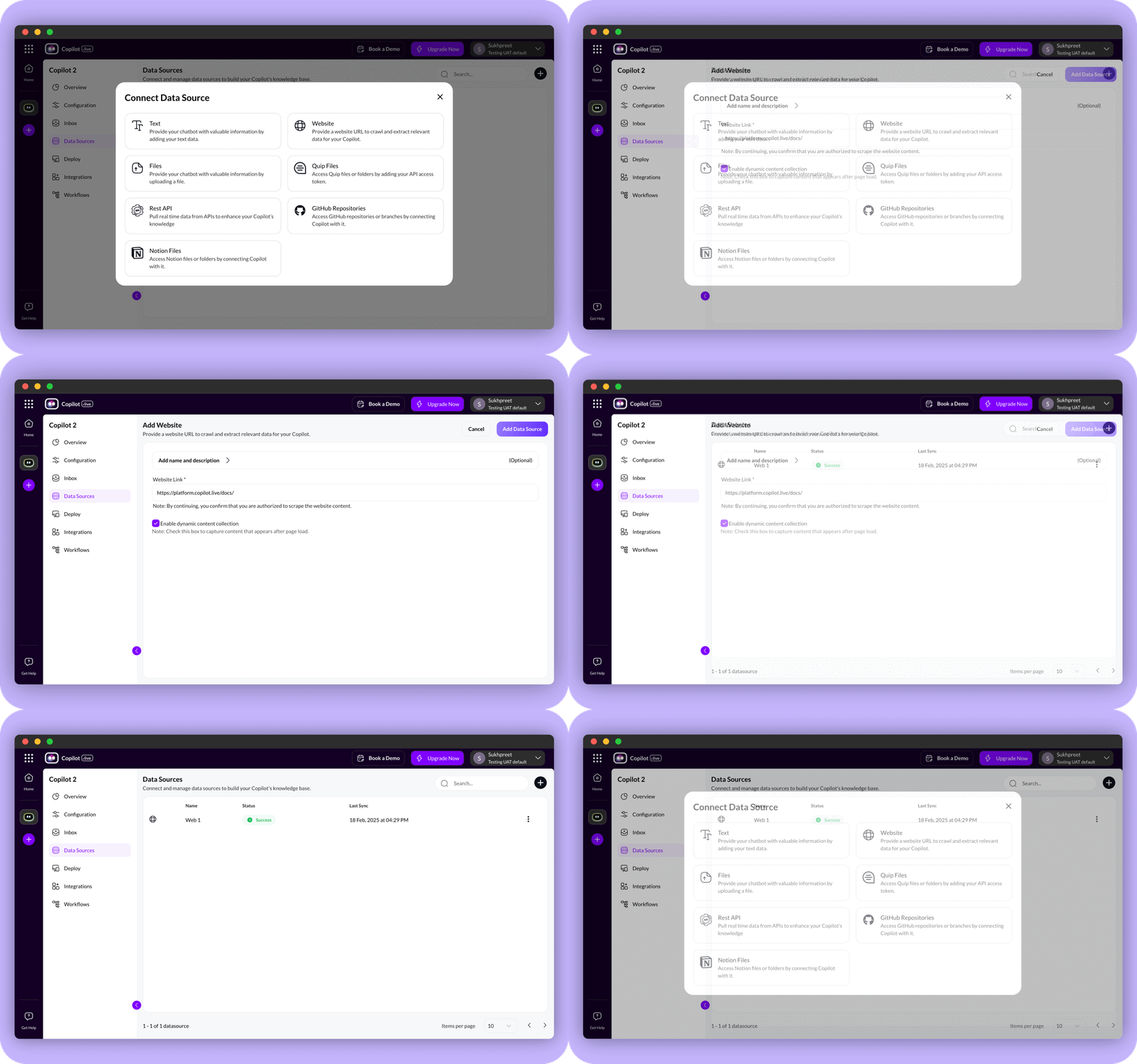
We have upgraded the Data Source experience with a more intuitive and user-friendly interface. Key improvements include:
- Revamped UI – A modern, easy-to-navigate design for a seamless user experience.
- Activity Logs – Track and monitor data activities with newly added logs for better insights.
- Enhanced Navigation – The Data Source has moved from a pop-up window to dedicated pages, improving accessibility and organization.
New Feature
XAI’s Grok Model Integration
We have integrated XAI’s Grok model into Copilot.live (now Fynd Kaily) to enhance AI performance. Key improvements include:
- More responsive AI for faster and smarter interactions.
- Improved AI voice conversations with smoother and more natural responses.
.avif)
Enhancement
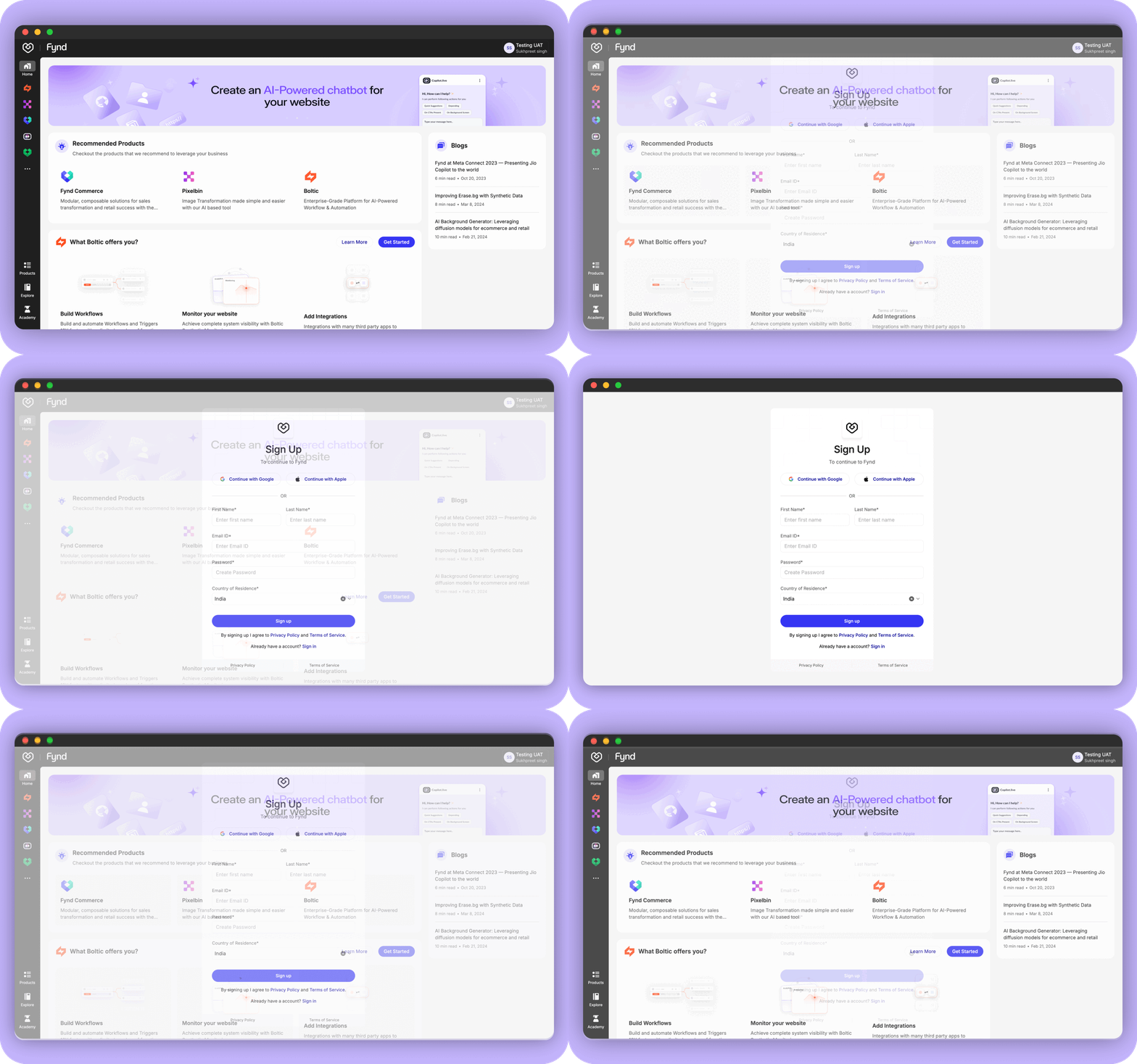
Fynd Console as Primary Login for Copilot.live (now Fynd Kaily)
To improve security and simplify authentication, Fynd Console is now the default login method for Copilot.live (now Fynd Kaily). Benefits of this update:
- Seamless access across Fynd products – No need to log in multiple times.
- Auto-login to Boltic and other Fynd tools for a hassle-free experience.
Enhancement
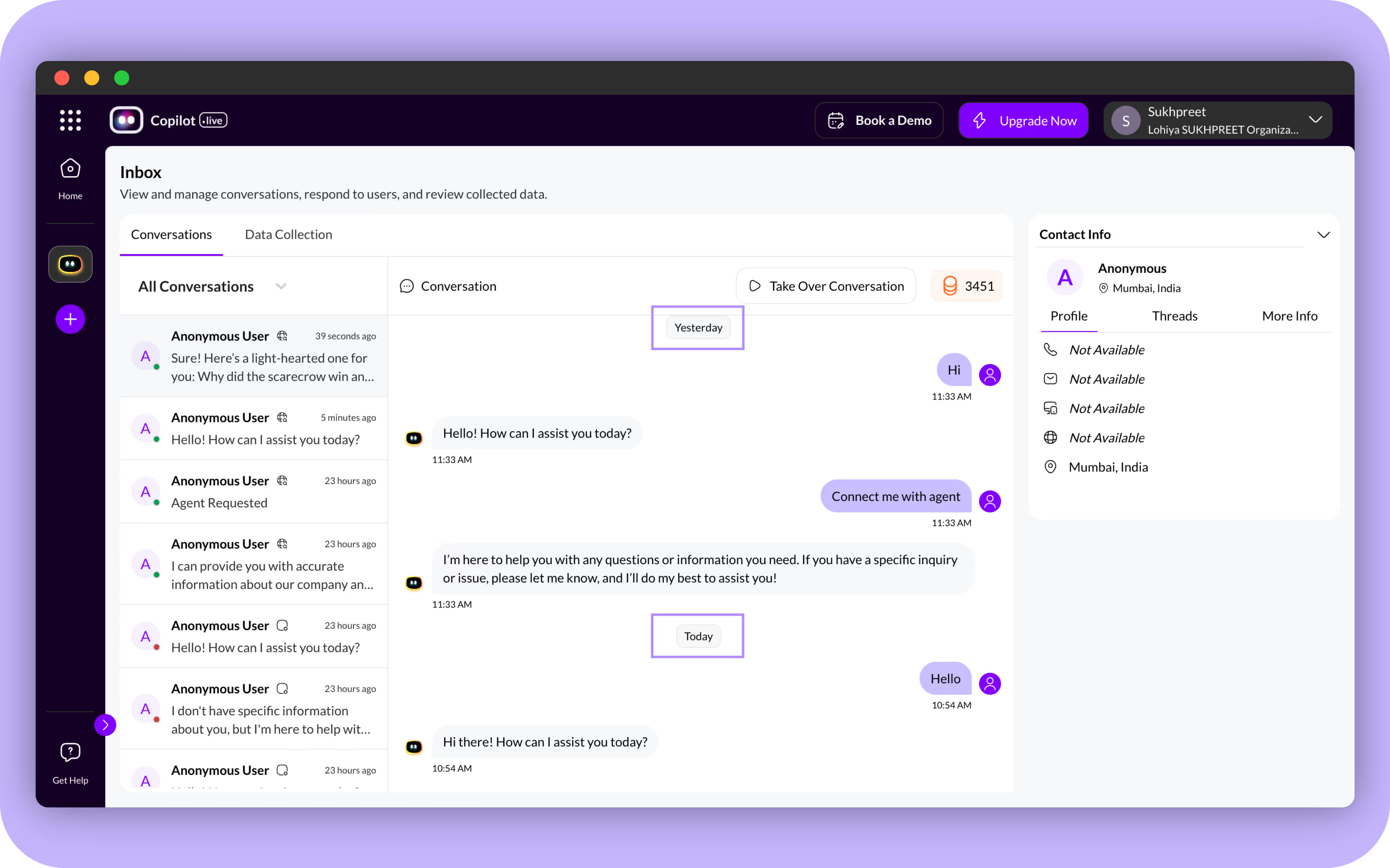
Message Timestamp Visibility
We have added timestamps to messages to enhance usability. This update provides:
- Better clarity and context in conversations.
- Improved tracking and auditability for a more organized experience.
Enhancement
Human Handover Rules in Settings
Users now have more control over when a conversation shifts from the AI agent to a human agent. In Settings, you can:
- Define custom handover rules based on customer sentiment, query complexity, or specific keywords.
- Improve customer satisfaction by ensuring timely and relevant support.
- Allow support teams to focus on complex issues while AI handles routine queries.
.avif)
New Feature
Freshchat Integration with Copilot.live (now Fynd Kaily)
Copilot.live (now Fynd Kaily) now integrates with Freshchat, enabling AI-driven conversations with smooth human handovers. This integration acts as an inbox for Copilot.live (now Fynd Kaily) to:
- Manage and respond to queries efficiently.
- Support multiple teams and high chat volumes.
- Provide seamless AI-human transitions for improved customer experience.
%2520(1).avif)
Enhancement
Refined Layouts and Content for Builder
We have improved the UI and content structure within the AI Agent Builder for a better user experience. Updates include:
- Enhanced pop-ups, cards, and section layouts for improved readability.
- More consistent UI elements for a streamlined building process.
- Clearer content presentation to reduce confusion and increase efficiency.
Enhancement
Click2Call API for Automations
The new Click2Call API enables automated outbound calls, making it easier to engage customers in real time. Key benefits include:
- Smoother automation of voice interactions within campaigns.
- Seamless conversation context transfer along with calls for better support.
- Improved customer experience through relevant, real-time interactions.
Enhancement
Set User Support in Hosted Webpages
The "Set User" feature is now supported on hosted webpages, allowing secure user data transfer. You can:
- Pass user details via query parameters for a seamless experience.
- Enhance security and personalization in embedded applications.
New Feature
Anthropic Claude Model Integration
To expand the range of models available, we integrated Claude 3 Haiku, Sonnet, and Opus models from Anthropic. These models offer users greater choice, allowing them to pick the right AI for their specific use case needs.
%2520(6).avif)
Enhancement
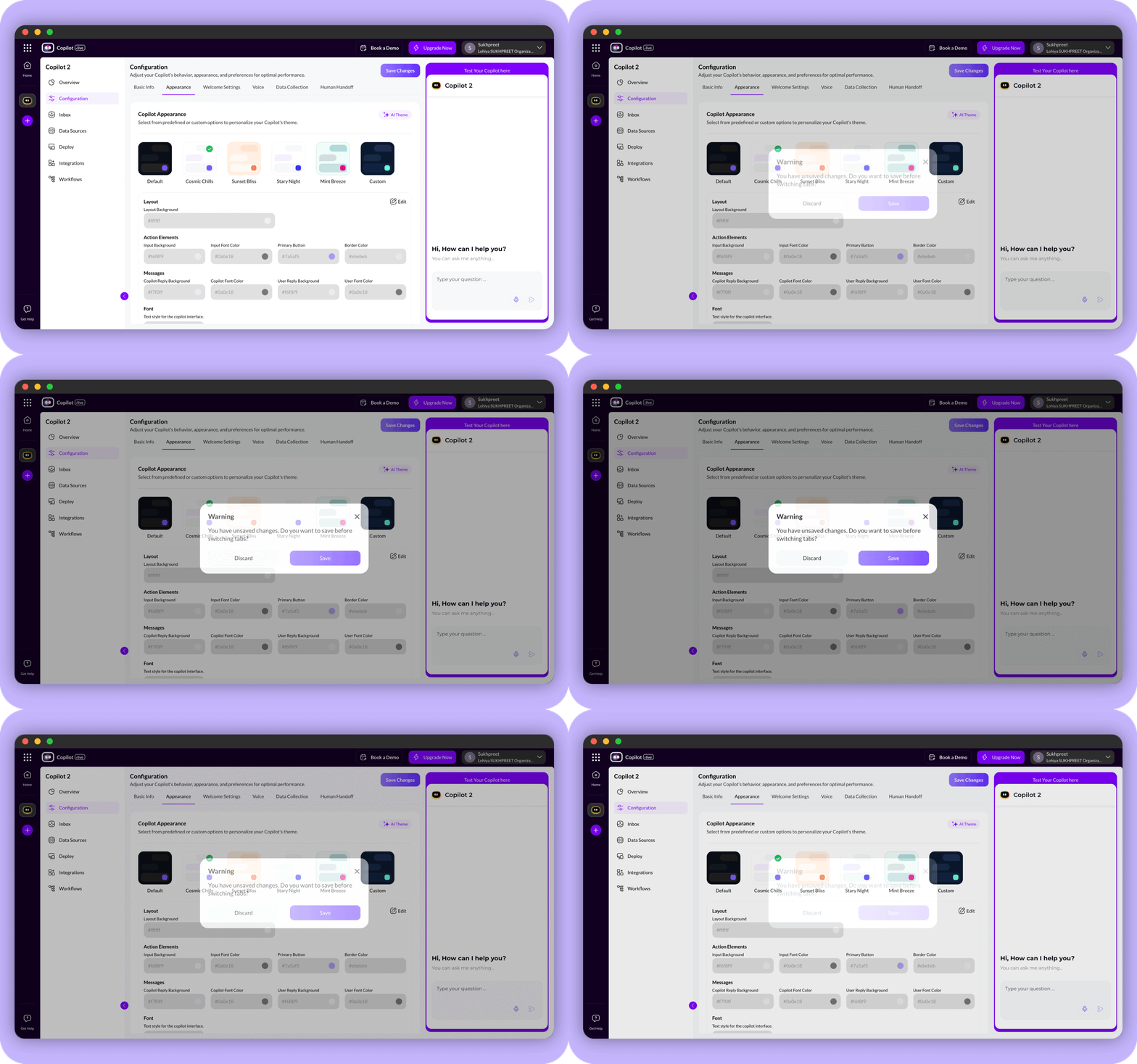
User Settings Optimization
We've streamlined user experience with intuitive pop-up notifications when switching tabs. If changes are pending, users are now instantly notified, reducing confusion and potential loss of data.
Enhancement
RAG Skill Enhancements
We have made significant upgrades to our retrieval-augmented generation (RAG) skills, ensuring that Fynd Kaily delivers more accurate and relevant knowledge-based responses.
- Better Accuracy – RAG skills now provide more precise and context-aware answers.
- Tailored Responses – Your AI agent adapts its answers to better match user-specific needs.
- Enhanced Knowledge Retrieval – Improved data retrieval ensures Copilot pulls and presents information more effectively.
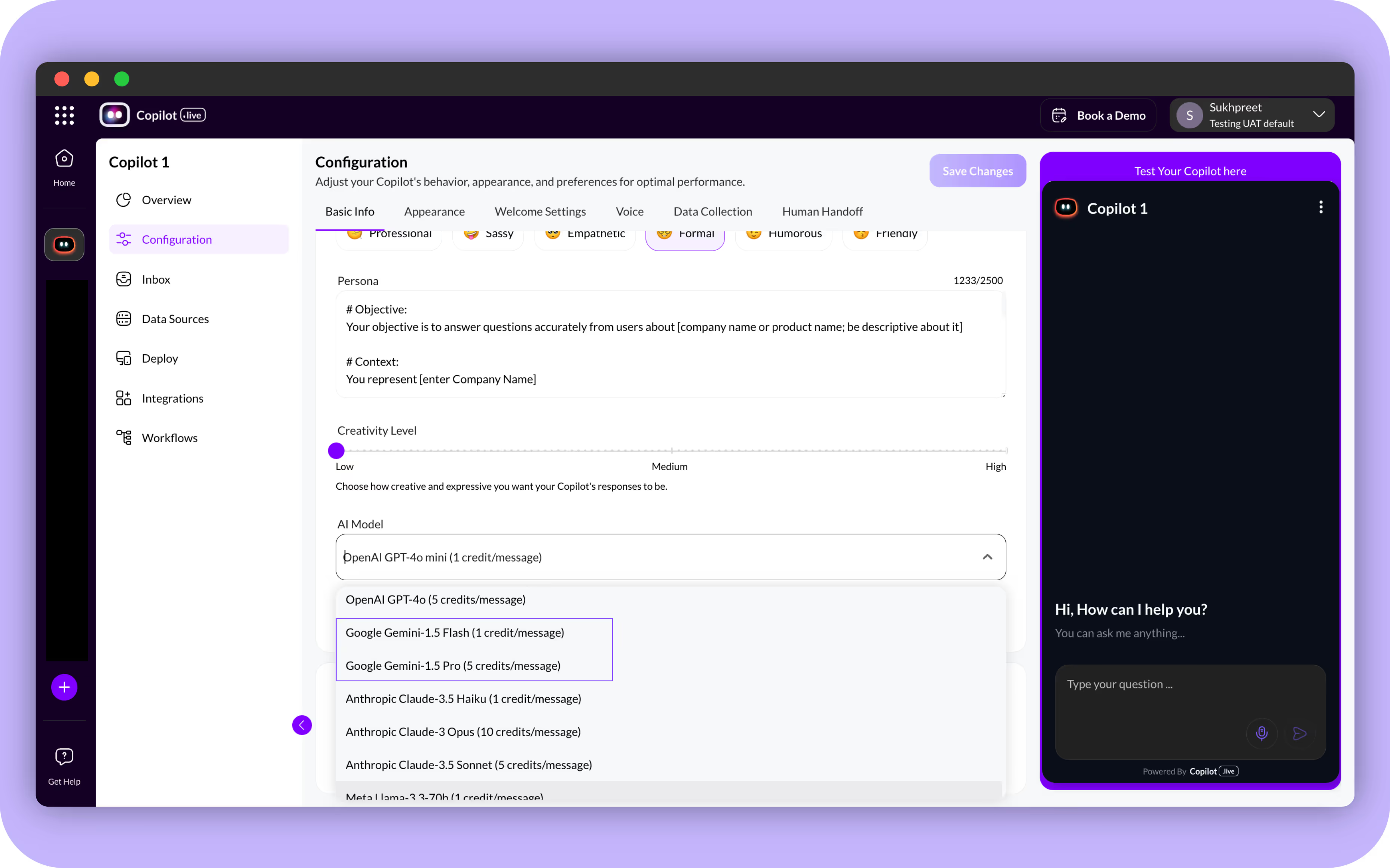
New Feature
Introducing Google Gemini Models
Expanding the selection of AI models, we introduced Gemini 1.5 Pro and Gemini 1.5 Flash models. These new additions provide users with a wider range of options, catering to diverse requirements for speed and accuracy in AI-driven tasks.
New Launch
Presenting Fify.ai
We’re excited to introduce Fify.ai, a dedicated platform showcasing Copilot.live's (now Fynd Kaily) full capabilities in ecommerce customer support. Designed as "Your Fashion Friend and Guide," Fify.ai provides a seamless and interactive experience for users exploring AI-powered fashion assistance.
- Smart Shopping Assistance – Get personalized fashion recommendations based on style preferences and trends.
- AI-Powered Customer Support – Resolve queries, track orders, and receive instant shopping assistance.

New Launch
Published Usecases
To complement our platform expansion, we have published 150+ use cases, demonstrating how various industries and sectors can leverage Copilot.live (now Fynd Kaily) to solve real-world challenges efficiently. These use cases serve as practical guides to help businesses understand how Fynd Kaily can streamline operations, improve customer experiences, and drive automation.
%2520(5).avif)
New Feature
Introducing AI Voice Calls
We took user interaction to the next level by introducing AI-powered voice functionality. You can now make real-time voice calls with Copilot.live (now Fynd Kaily), just like talking to a human agent. Fynd Kaily can handle complex tasks through voice commands, making your experience more personal and interactive.
- Talk to your AI agent using your voice, just as you would with a human.
- Handle complex queries more naturally with voice-driven interactions.
- Experience personalized support, making every interaction feel more engaging and efficient.
%2520(1).avif)
Enhancement
Credit-Based Voice Usage
In alignment with the introduction of voice functionality, we’ve implemented a credit deduction system to manage voice-based interactions. This ensures that usage is fair and transparent for all users.
- Track Voice Usage: Credits are deducted based on your voice interactions.
- Fair and Transparent: Ensures clear and equitable usage for everyone.
- Affordable: Keeps voice calls cost-effective and easy to manage.
New Feature
Human Takeover for Critical Conversations
Recognizing the need for human intervention in specific scenarios, we added a manual “take-over” button. When Copilot.live (now Fynd Kaily) is unable to satisfy user needs, human agents can seamlessly step in to provide personalized support, ensuring a superior customer service experience.
- Seamless Handover: Human agents can easily take over conversations.
- Personalized Assistance: Get tailored support for complex or unresolved issues.
- Better Customer Experience: Ensures every query is fully addressed with expert help.
%2520(2).avif)
New Feature
GPT-4o Integration
Accuracy meets affordability. This language model is not only more accurate but also significantly more cost-efficient, offering a smarter, more economical solution for our users.
%2520(3).avif)
Enhancement
Expanded Data Integration
We’ve expanded Copilot.live's (now Fynd Kaily)integration capabilities to support Git, Quip, and Notion. This makes it easier for users to bring all their important data into the platform, improving productivity and collaboration.
- More Integrations: Now supports Git, Quip, and Notion.
- Easier Data Access: Bring your critical data into Fynd Kaily with ease.
%2520(4).avif)
New Launch
Real-Time Status Monitoring
User's can now monitor the platform's operational health in real time with the new status.kaily.ai. This feature keeps you informed about any potential downtime or updates.
- Live System Status: View the current health of Copilot.live (now Fynd Kaily).
- Instant Notifications: Get alerts about downtime or maintenance.
- Transparency: Stay informed about system updates and issues.
.avif)
New Launch
Introducing Chat with PDF
We are excited to introduce Chat with PDF, a powerful new feature in Copilot.live (now Fynd Kaily) that allows users to upload PDFs and get instant answers. No more manually searching through lengthy documents—Fynd Kaily does it for you in real time.
Instant Answers – Upload a PDF, and get quick, accurate responses in real time.
AI-Powered Smart Search – Copilot (now Fynd Kaily)scans FAQs, research papers, and manuals to find relevant answers.
Boost Productivity – No more manual searching—extract key information effortlessly.
Try Chat with PDF Today – Make document reading faster, smarter, and more efficient with AI.
%2520(7).avif)


